
Quickstart

Create your first inbox with the AgentMail API

Quickest start

$pip install agentmail

Sign up your agent and get an API key in one call (no console needed):

1from agentmail import AgentMail
2
3client = AgentMail()
4response = client.agent.sign_up(human_email="you@example.com", username="my-agent")
5# response.api_key -> store this securely
6# response.inbox_id -> my-agent@agentmail.to

Verify with the OTP sent to your email, then send a message:

1client = AgentMail(api_key="am_...")
2client.agent.verify(otp_code="123456")
3
4inbox = client.inboxes.create()
5client.inboxes.messages.send(inbox.inbox_id, to="user@example.com", subject="Hello", text="Hello from my agent!")

Already have an account? Get your API key from the Console and skip straight to sending emails.

Copy for Cursor / Claude

Copy one of the blocks below into Cursor or Claude for a complete, working AgentMail integration. Each block includes setup, API reference, error handling, rate limiting, and idempotency guidance.

1"""
2AgentMail Python Quickstart — copy into Cursor/Claude for instant setup.
3
4Setup: pip install agentmail python-dotenv. Set AGENTMAIL_API_KEY in .env.
5
6Agent sign-up (no API key needed):
7- agent.sign_up(human_email, username) — returns api_key, inbox_id, organization_id
8- agent.verify(otp_code) — verify with OTP sent to human_email
9
10API reference:
11- inboxes.create(username?, domain?, display_name?, client_id?) — client_id for idempotent retries
12- messages.send(inbox_id, to, subject, text, html?, cc?, bcc?, reply_to?, attachments?)
13- messages.list(inbox_id, limit?, page_token?, labels?) — receive emails; use extracted_text/extracted_html for reply content
14
15Errors: SDK raises on 4xx/5xx. Inspect error.body.message or str(e).
16Rate limit: 429 with Retry-After header. Implement exponential backoff for retries.
17Idempotency: Pass client_id to inboxes.create() to safely retry without duplicates.
18"""
19import os
20from dotenv import load_dotenv
21from agentmail import AgentMail
22
23load_dotenv()
24client = AgentMail(api_key=os.getenv("AGENTMAIL_API_KEY"))
25
26# Create inbox (client_id enables safe retries)
27inbox = client.inboxes.create(client_id="my-agent-inbox-v1")
28
29# Send email
30try:
31 client.inboxes.messages.send(
32 inbox.inbox_id,
33 to="recipient@example.com",
34 subject="Hello from AgentMail",
35 text="Plain text body",
36 html="<p>HTML body</p>",
37 )
38except Exception as e:
39 # Handle validation, not found, rate limit (429), etc.
40 print(f"Send failed: {e}")
41 raise
42
43# Receive messages
44for msg in client.inboxes.messages.list(inbox.inbox_id, limit=10).messages:
45 print(msg.subject, msg.extracted_text or msg.text)

When receiving emails, messages include extracted_text and extracted_html for reply content without quoted history.

This guide walks you through signing up, authenticating, and creating your first email inbox.

1

Sign up and get an API key

You have two options to get an API key:

Option A: Agent sign-up (programmatic)

Use the Agent API to create an account and get an API key without leaving your terminal. No console access needed.

1from agentmail import AgentMail
2
3client = AgentMail()
4response = client.agent.sign_up(
5 human_email="you@example.com",
6 username="my-agent"
7)
8print(response.api_key) # store this securely
9print(response.inbox_id) # my-agent@agentmail.to

A 6-digit OTP is sent to the provided email. Verify to unlock full permissions:

1client = AgentMail(api_key=response.api_key)
2client.agent.verify(otp_code="123456")

The sign-up endpoint is idempotent. Calling it again with the same email rotates the API key and resends the OTP if expired.

Option B: Console (manual)

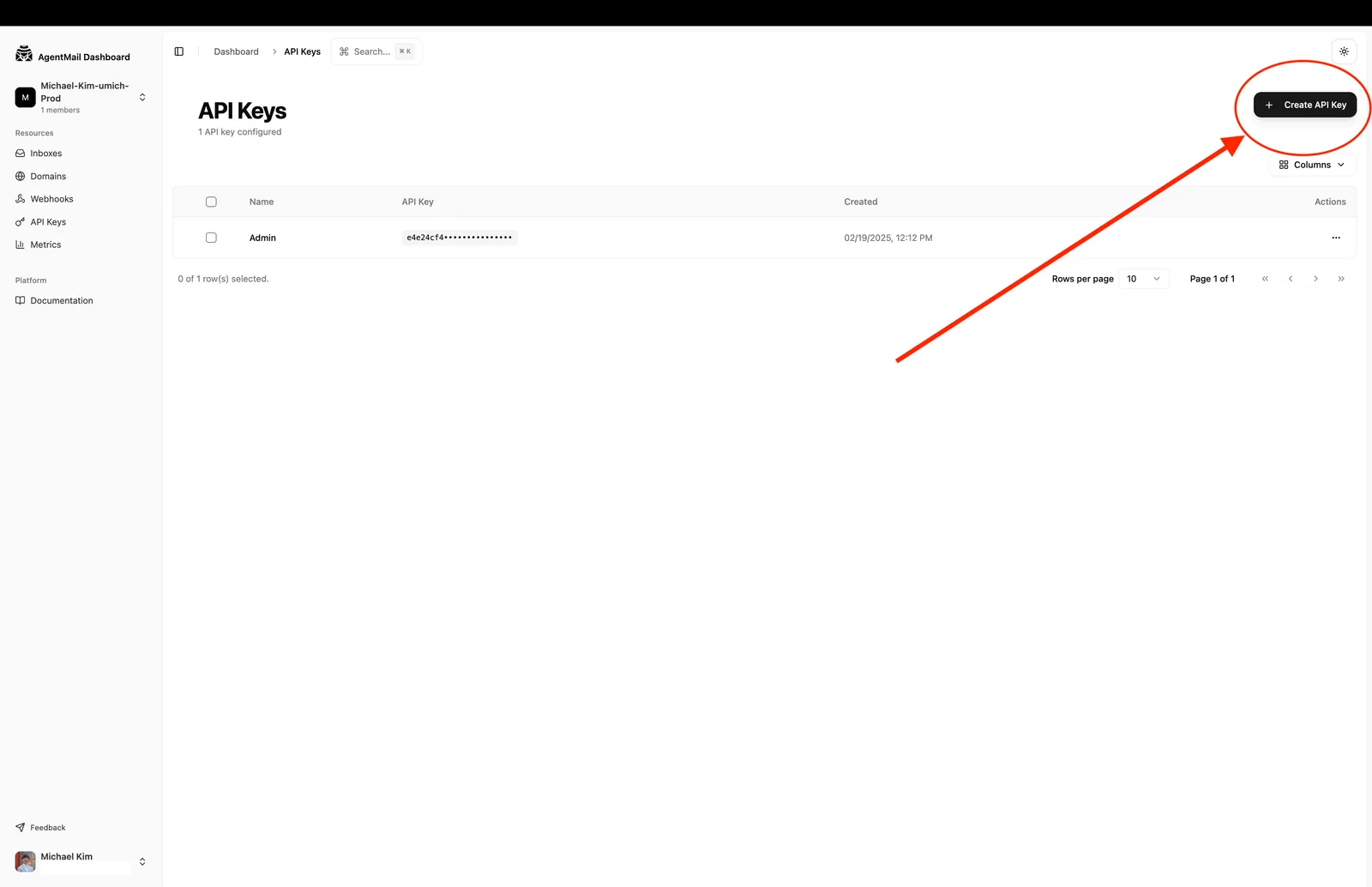
Go to the AgentMail Console, create an account, and generate an API key from the dashboard. API Key Creation Screenshot

2

Store your API key

Create a .env file in your project root and add your key:

$AGENTMAIL_API_KEY=am_...

We recommend using environment variables to keep your keys secure.

3

Install the SDK

Install the AgentMail SDK using your preferred package manager. We’ll also use a library to load the environment variable from the .env file.

$pip install agentmail python-dotenv
4

Create an inbox and send an email

Now you’re ready to make your first API call. Create a new file (e.g., quickstart.py or quickstart.ts) and add the following code. This script will initialize the AgentMail client, create a new inbox, and then send a test email.

1import os
2from dotenv import load_dotenv
3from agentmail import AgentMail
4
5# Load the API key from the .env file
6load_dotenv()
7api_key = os.getenv("AGENTMAIL_API_KEY")
8
9# Initialize the client
10client = AgentMail(api_key=api_key)
11
12# Create an inbox
13print("Creating inbox...")
14inbox = client.inboxes.create() # domain is optional
15print("Inbox created successfully!")
16print(inbox)
17
18# Send Email
19
20client.inboxes.messages.send(
21 inbox.inbox_id,
22 to="your-email@example.com",
23 subject="Hello from AgentMail!",
24 text="This is my first email sent with the AgentMail API.",
25)

The domain parameter is optional. If not provided, AgentMail will use the default @agentmail.to domain. If you would like a custom domain, please upgrade to a paid plan.

5

Run the code

Execute the script from your terminal.

$python quickstart.py

You should see the details of your newly created inbox printed to the console. Congratulations, you’ve successfully created your first AgentMail inbox!

Next Steps

You’ve created an inbox and sent your first email. Explore the full power of agents that can autonomously reply, take action, parse attachments, and semantically search inboxes:

Looking for a different language? Email us at support@agentmail.cc and we’ll get you set up.