Give your CRM agent an AgentMail inbox

Build an AgentMail-powered CRM agent that receives buyer email, extracts sales context, updates Attio, and replies in the same thread.
- developer-resources
- agentmail
- crm
- attio
- ai-agents
TL;DR
- The app: Give a CRM agent its own AgentMail inbox. Buyers email the agent directly; it extracts sales context, updates Attio, and replies in the same thread.
- The stack: AgentMail handles inbound and outbound email, Anthropic structures each message, and Attio stores the CRM record. Uncertain or high-value replies wait for review.
- The code: Clone the complete implementation and follow the steps below to run it with your own accounts.
What you'll build
I wanted my CRM process to be fully agentic, so I gave the agent its own AgentMail address. A buyer can email the agent directly; the agent reads the message, updates the buyer in Attio, and replies in the same email thread. It handles routine messages on its own and holds uncertain or high-value replies for review.
How it works
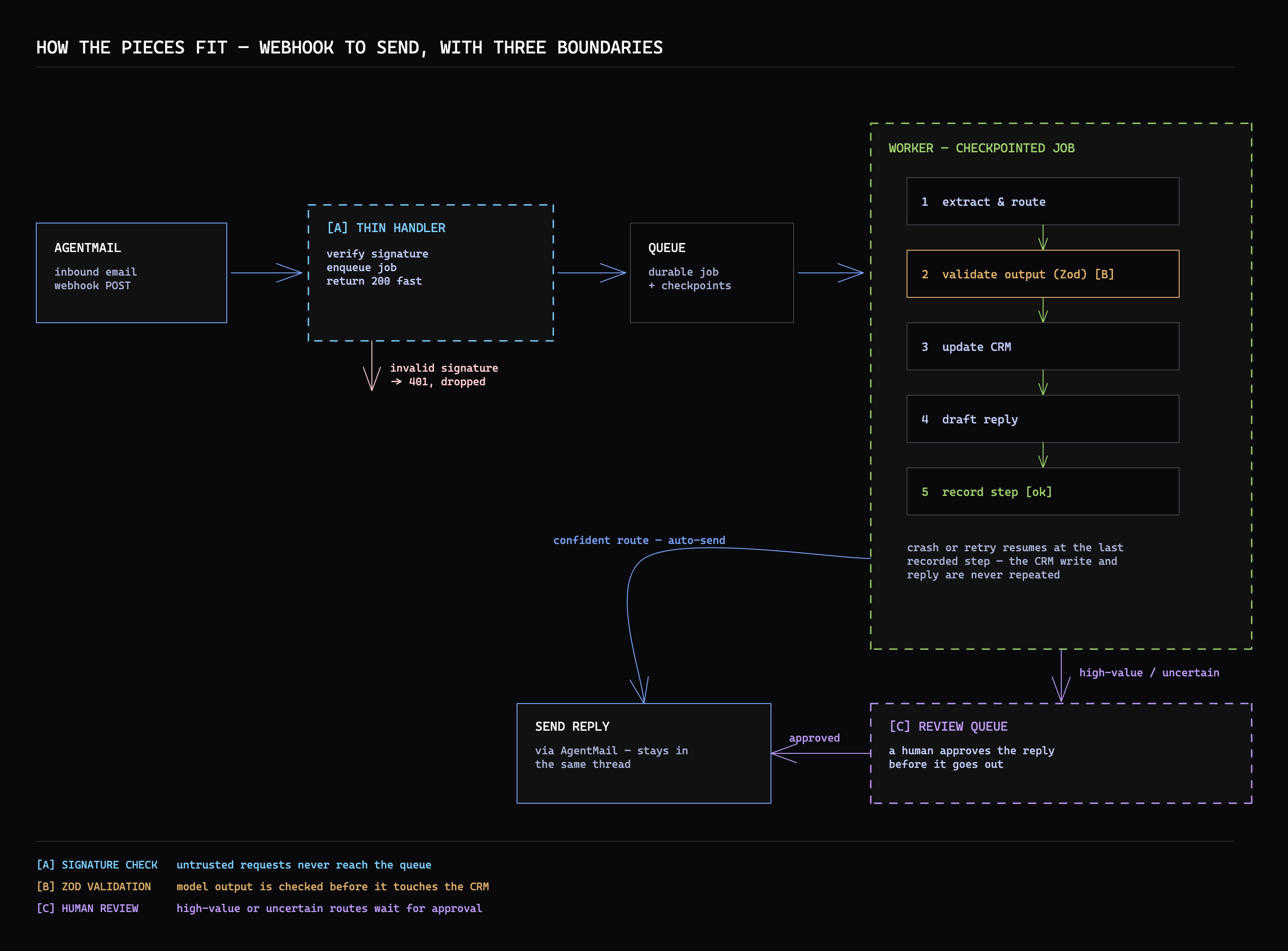
AgentMail handles both inbound and outbound email. It receives the buyer's message and sends a signed message.received webhook to your app. The app extracts the sales context with Anthropic, writes it to Attio, then uses AgentMail to reply to the message that started the thread.
Prerequisites
- Node 24 or newer and Bun.
- An AgentMail API key.
- An Anthropic API key.
- An Attio workspace token with People record and object-configuration write access.
- An ngrok account and authenticated CLI for local development.
Clone the complete implementation, install it, and create your local environment file:
Bash
git clone https://github.com/agentmail-to/crm-agent-blog.gitcd crm-agent-blogbun installcp .env.example .envAdd AGENTMAIL_API_KEY, ANTHROPIC_API_KEY, and ATTIO_API_KEY to .env.
1. Create the webhook URL
AgentMail needs a public HTTPS URL that can reach your local app. The app also has CRM, job, and review routes that should stay local, so scripts/webhook-gateway.ts exposes only POST /webhooks and forwards the signed request to port 3000:
TypeScript
import { createServer, request } from "node:http";// ...export function createWebhookGateway(upstreamPort: number) { return createServer((incoming, outgoing) => { if (incoming.method !== "POST" || incoming.url !== "/webhooks") { outgoing.writeHead(404, { "content-type": "text/plain; charset=utf-8" }); outgoing.end("Not found"); return; } const upstream = request( { hostname: "127.0.0.1", port: upstreamPort, path: "/webhooks", method: "POST", headers: incoming.headers, }, (response) => { outgoing.writeHead(response.statusCode ?? 502, response.headers); response.pipe(outgoing); }, ); upstream.on("error", (error) => { console.error(`webhook gateway: ${error.message}`); if (!outgoing.headersSent) { outgoing.writeHead(502, { "content-type": "text/plain; charset=utf-8" }); } if (!outgoing.writableEnded) outgoing.end("Webhook app unavailable"); }); incoming.pipe(upstream); });}Start the gateway in one terminal:
Bash
bun run webhook:gatewayAuthenticate ngrok once, then point it at the gateway in another terminal:
Bash
ngrok config add-authtoken <your-ngrok-authtoken>ngrok http 3001ngrok prints an HTTPS forwarding URL. Add /webhooks to it in .env, as required by AgentMail's webhook setup:
Code
WEBHOOK_URL=https://your-ngrok-domain.ngrok.app/webhooksKeep the gateway and ngrok running. If ngrok gives you a new URL after a restart, update the webhook URL in the AgentMail dashboard before sending another message.
2. Give the agent an AgentMail inbox
The AgentMail inbox gives people a stable address for the agent. Create scripts/setup-agentmail.ts and initialize the official SDK with your AgentMail API key. The same script creates the inbox and subscribes it to message.received:
TypeScript
import { AgentMailClient } from "agentmail";import { z } from "zod";const env = z .object({ AGENTMAIL_API_KEY: z.string().min(1), WEBHOOK_URL: z.string().url(), }) .parse(process.env);const agentMail = new AgentMailClient({ apiKey: env.AGENTMAIL_API_KEY });const inbox = await agentMail.inboxes.create({ username: "crm-agent", displayName: "CRM Agent", clientId: "crm-agent-inbox",});const webhook = await agentMail.webhooks.create({ url: env.WEBHOOK_URL, eventTypes: ["message.received"], inboxIds: [inbox.inboxId], clientId: "crm-agent-webhook",});Run the setup:
Bash
bun run setup:agentmailIt prints the new inbox address, CRM_AGENT_INBOX_ID, and AGENTMAIL_WEBHOOK_SECRET. Add the last two values to .env. The app uses them to accept signed deliveries for that inbox.
3. Receive AgentMail's webhook
AgentMail's webhook body uses snake_case keys. Define the subset the app consumes in src/wire.ts; z.looseObject() keeps additional AgentMail fields available without rejecting the event:
TypeScript
export const WireMessage = z.looseObject({ inbox_id: z.string(), thread_id: z.string(), message_id: z.string(), labels: z.array(z.string()), timestamp: z.string(), /** `username@domain.com` or `Display Name <username@domain.com>` */ from: z.string(), to: z.array(z.string()), subject: z.string().optional(), /** Full plain-text body. */ text: z.string().optional(), html: z.string().optional(), /** Only the NEW text in a reply, quoted history stripped. Prefer this * over `text` when it is present, or the extractor re-reads the whole * thread every time someone replies. */ extracted_text: z.string().optional(),});// ...export const MessageReceivedEvent = WireEventEnvelope.extend({ event_type: z.literal("message.received"), message: WireMessage, thread: z.unknown(),});Svix signs the exact request bytes on AgentMail's behalf. In src/server.ts, createApp() receives the configured inbox as opts.inboxId and constructs app and the Svix verifier wh. Add POST /webhooks with express.raw(), verify the signature, then parse the event and confirm it belongs to that inbox:
TypeScript
app.post("/webhooks", express.raw({ type: "application/json" }), async (req, res) => { // 1. Trust boundary: only requests signed with our secret get past here. let verified: unknown; try { const headers = Object.fromEntries( Object.entries(req.headers).flatMap(([name, value]) => typeof value === "string" ? [[name, value]] : [], ), ); verified = wh.verify(req.body, headers); } catch { log("rejected: signature verification failed"); res.status(400).json({ error: "invalid webhook signature" }); return; } // ... const parsed = MessageReceivedEvent.safeParse(verified); if (!parsed.success) { res.status(400).json({ error: "malformed message.received payload" }); return; } const event = parsed.data; if (event.message.inbox_id !== opts.inboxId) { res.status(403).json({ error: "event delivered for a different AgentMail inbox" }); return; }Keep JSON middleware away from this route. Parsing and serializing the body before wh.verify() changes the bytes and makes a genuine AgentMail delivery fail its signature check. A successful check produces event, a verified and typed AgentMail message.
4. Turn the email into an Attio record
The message is free-form text, but Attio needs stable fields. Define those fields in src/extractor.ts before calling the model. Closed enums stop the model from inventing stages or categories, and nullable fields make missing details explicit:
TypeScript
export const DealStageSchema = z.enum([ "new_lead", "evaluating", "negotiating", "closed_won", "closed_lost",]);export const DEAL_STAGES = DealStageSchema.options;export const CategorySchema = z.enum(["sales", "support", "spam", "other"]);export const CATEGORIES = CategorySchema.options;export const ExtractionSchema = z.object({ contact_name: z.string().min(1).nullable(), company: z.string().min(1).nullable(), email: z.string().email().nullable(), intent: z.string().min(1).nullable(), deal_stage: DealStageSchema.nullable(), category: CategorySchema, summary: z.string().min(1).nullable(), confidence: z.enum(["high", "low"]),});export type Extraction = z.infer<typeof ExtractionSchema>;LlmExtractor.extract() in src/llm-extractor.ts receives the AgentMail sender, subject, and body. It validates Anthropic's response before returning anything to the CRM code:
TypeScript
const response = await this.client.messages.create({ model: MODEL, max_tokens: 512, system: SYSTEM_PROMPT, messages: [ { role: "user", content: `From: ${input.from}\nSubject: ${input.subject}\n\n${input.text}${context}`, }, ], }); const block = response.content.find((b) => b.type === "text"); if (!block || block.type !== "text") { throw new Error("Anthropic returned no text extraction"); } // Pull the first JSON object from a response that includes prose, then // validate it here before any CRM code can receive it. const match = block.text.match(/\{[\s\S]*\}/); if (!match) throw new Error("Anthropic returned no JSON extraction"); try { return ExtractionSchema.parse(JSON.parse(match[0])); } catch { throw new Error("Anthropic returned an invalid CRM extraction"); }Once the result passes the schema, AttioCrmStore.upsert() in src/crm-attio.ts maps it onto a Person record. Attio's assert endpoint uses the sender's email as the matching attribute, so the same call creates a new buyer or updates an existing one:
TypeScript
const values: Record<string, unknown> = { email_addresses: [email], crm_agent_stage: [{ value: stage }], crm_agent_category: [{ value: extraction.category }], crm_agent_needs_review: [{ value: needsReview }], }; if (fullName) { values.name = [{ first_name: first ?? "", last_name: rest.join(" "), full_name: fullName }]; } if (company) values.crm_agent_company = [{ value: company }]; if (intent) values.crm_agent_intent = [{ value: intent }]; if (summary) values.crm_agent_summary = [{ value: summary }]; // Assert = upsert by email in one call. await this.api(`/objects/${OBJECT}/records?matching_attribute=email_addresses`, { method: "PUT", body: JSON.stringify({ data: { values } }), });The adapter creates the crm_agent_* attributes on its first write. A sparse follow-up keeps the existing name, company, stage, and summary instead of replacing known Attio values with null.
5. Reply through AgentMail
The agent can continue the email conversation after Attio is updated. route() drops spam, allows replies to routine sales and support messages, and requires approval for high-value or low-confidence messages.
Worker.process() in src/worker.ts receives the verified AgentMail message, the validated extraction, the Attio result, and a drafted reply. Its final branch either saves that draft for review or calls AgentMail with the inbox and message IDs from the webhook:
TypeScript
if (decision.requiresApproval) { const action = store.createAction({ jobId, contactEmail: extraction.email ?? sender.email, inboxId: message.inbox_id, threadId: message.thread_id, messageId: message.message_id, draft, status: "pending", reason: decision.reason, }); store.stepPut(jobId, "deliver", { actionId: action.id, sent: false }); store.setStatus(jobId, "needs_review"); this.log(`job ${jobId}: reply queued for approval (action ${action.id})`); return { status: "needs_review", actionId: action.id, detail: decision.reason }; } await agentMail.inboxes.messages.reply( message.inbox_id, message.message_id, { text: draft }, { idempotencyKey: `crm-agent-${event.event_id}` }, );Replying to the received message_id keeps the response in the buyer's existing AgentMail thread. The webhook event ID becomes AgentMail's idempotency key, so retrying the same send returns the original result instead of creating another reply. The worker also records the completed delivery before closing the job. An approved draft uses the review action ID as its idempotency key.
Run it
With the gateway and ngrok still running, start the app in another terminal:
Bash
bun run devIn another terminal, run the live demo:
Bash
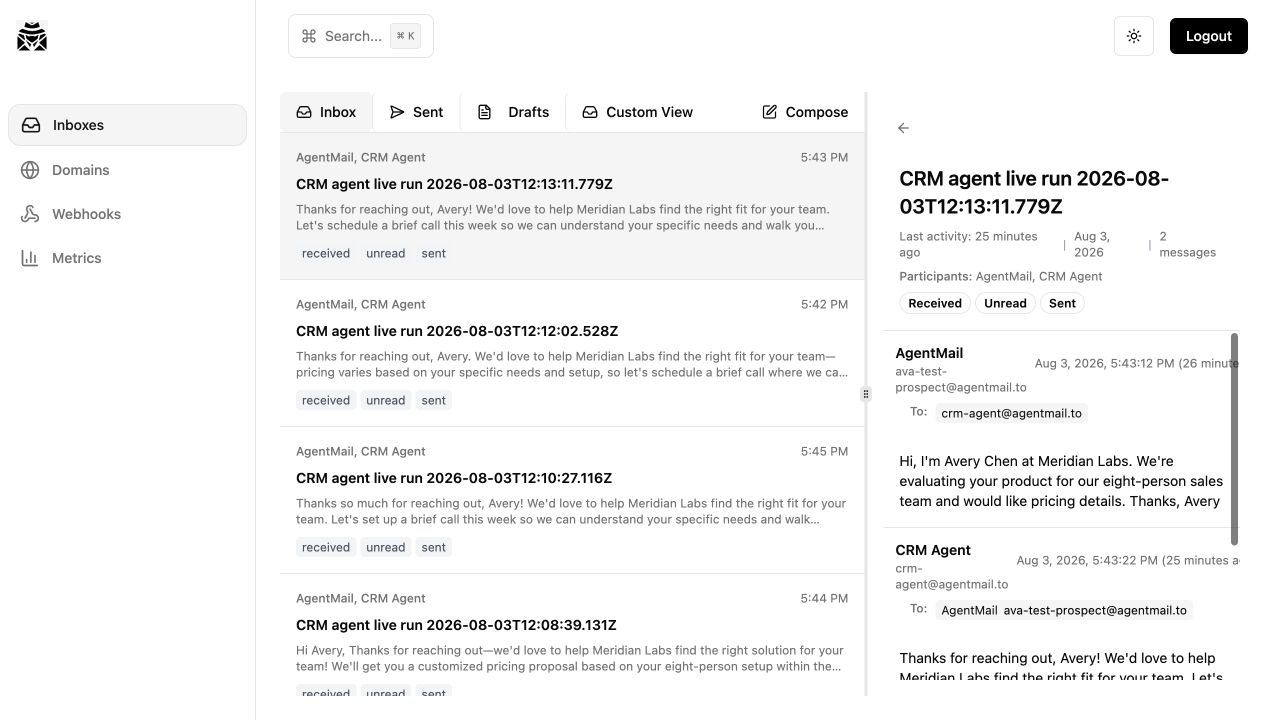
bun run demoThe demo creates or reuses a second AgentMail inbox and sends a buyer email to the CRM agent. It waits for the Attio Person record, then confirms that a reply arrived in the same AgentMail thread.
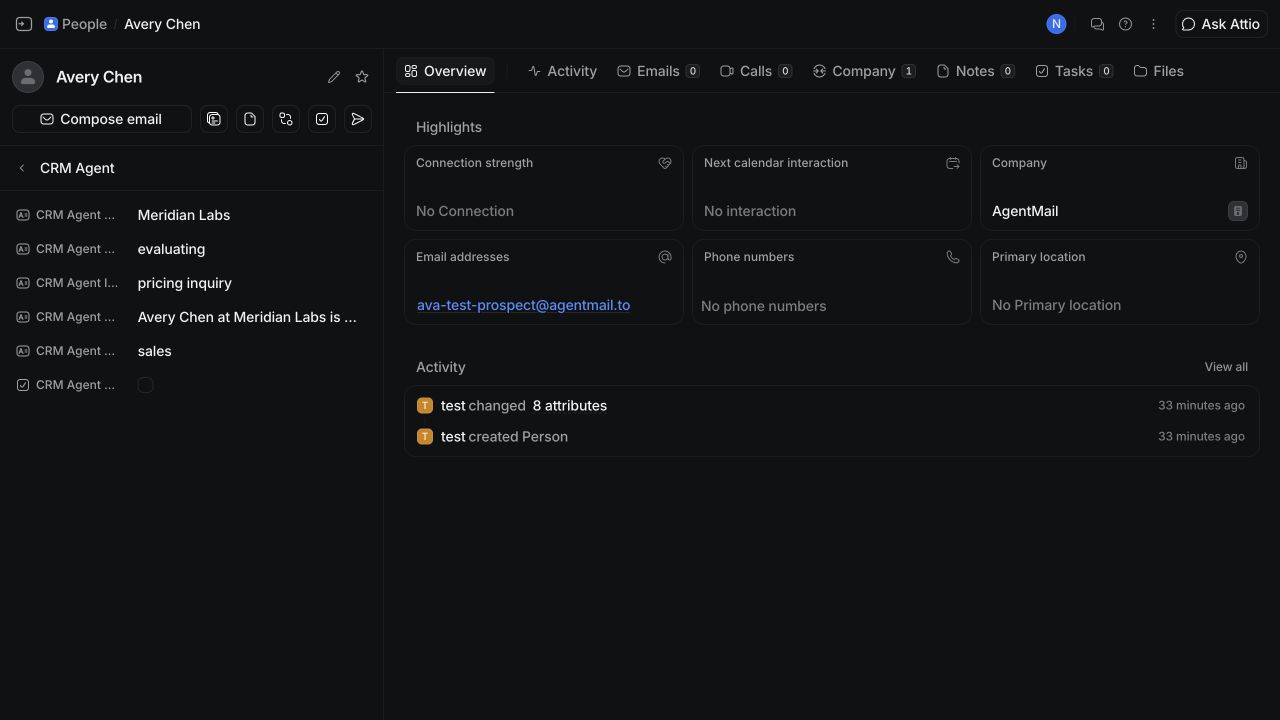
In the recorded run, AgentMail delivered the buyer email and signed webhook. Attio returned Avery Chen at Meridian Labs with stage evaluating and intent pricing inquiry, then AgentMail delivered the reply in the same thread.
The AgentMail dashboard shows the buyer message and the agent's reply in the same thread:
The Attio dashboard shows the CRM fields written to Avery Chen's Person record:
Next steps
For a deployed version, replace ngrok with an HTTPS route that exposes only POST /webhooks. Move job processing out of the webhook request, and protect the CRM and review routes with authentication. If Person attributes become too small for the sales process, move the deal fields into a dedicated Attio List or Deal object; the AgentMail inbox and reply flow stay the same.