14 Inbound Reply Parsers for Agent Inboxes Compared (2026)

Compare 14 inbound reply parsers for agent inboxes by provisioning, webhooks, reply extraction, thread ownership, and the best fit for each job.
- developer-resources
- comparison
- inbound-email
- email-parsing
- ai-agents

TL;DR
- Best overall: AgentMail is the best inbound email API when each AI agent needs its own managed inbox, parsed reply content, thread state, and an in-thread reply operation. Gmail API fits agents that act on an existing Gmail mailbox. Postmark and Mailgun fit teams with existing webhook pipelines, while Amazon SES and a DIY SMTP stack fit teams that want to own more of the receive-and-parse path.
- What your application still owns: action policy, duplicate-event handling, attachment safety, and a fallback to the original message when reply extraction fails.
An autonomous agent can receive an email that changes its next action. A customer may confirm a time, send an exception, ask for a correction, or reply with information the agent needs before it continues.
The agent does not need the whole email package as its working input. It needs to identify the sender's new message, retain enough context to understand it, and respond in the same conversation when a response is appropriate.
That is why an inbound webhook alone is not the whole solution. Raw email can include MIME structure, attachments, and quoted history. A model can also make repeat mistakes when it is asked to turn complex raw email into structured data.
This guide covers the engineering choice underneath that workflow: the best email API for receiving and parsing replies in AI agents.
I compare how each option delivers inbound mail, whether it provides new-reply content and under what conditions, and who owns thread state and the reply.
On this page
- Why do AI agents need parsing APIs for inbound content?
- What should you look for in an inbound email API?
- Best tools for receiving and parsing replies in AI agents
- Should I use a hosted inbox API or build on SMTP?
- Which tool should you choose?
Why do AI agents need parsing APIs for inbound content?
AI agents need parsing APIs for inbound email because a raw delivery event can contain MIME structure, quoted history, and attachments, while the agent needs the sender's usable new content and enough context to reply in the same conversation.
An agent that handles support, scheduling, sales, or operations work can receive an instruction, confirmation, exception, or reply while it is carrying out work on the internet.
Its next action depends on the new message from the sender, not the older thread copied beneath it.
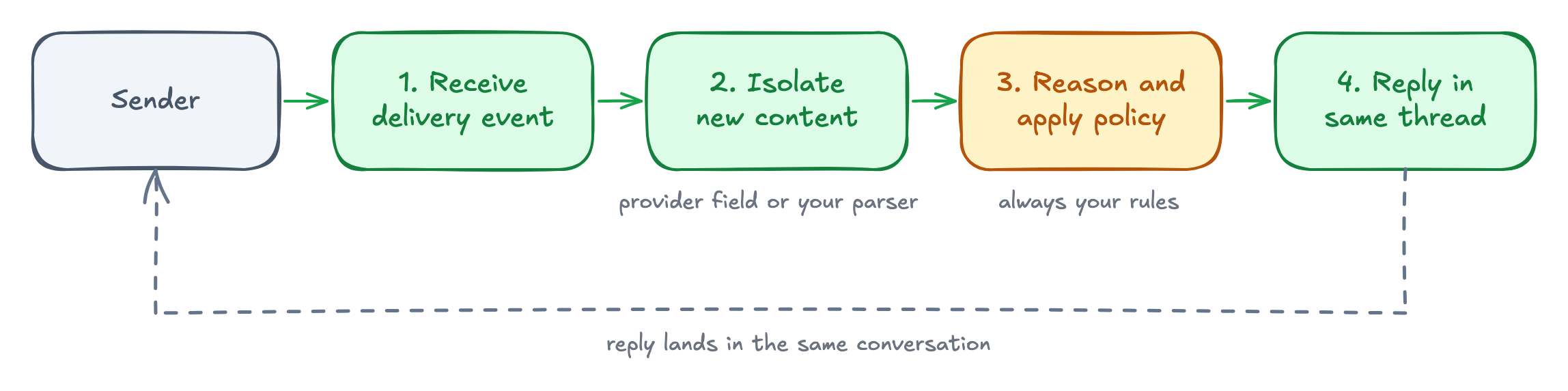
The inbound reply loop has four steps:
- Receive the message
- Isolate the new content
- Reason over that content
- Reply in the same conversation.
Each step needs a boundary in the email API. The application needs a delivery event or retrieval path, a usable content field or raw fallback, and a way to preserve or set the email headers that associate a reply with the earlier message. Threading is conversation state here.
This guide evaluates four parts of the inbound path: whether the service can provision inboxes, how the message reaches the application, how it handles new-reply content, and how it supports threading and replies. It does not compare generic transactional sending, inbox placement, or template features. For the separate question of agent identity and inbox primitives, see our comparison of email APIs for agent identity and inbox primitives.
What should you look for in an inbound email API?
The right inbound email API depends on how much of the email stack your team wants to run.
For instance, a managed inbox API can create an address for each agent and retain its messages. A route-to-webhook service delivers mail from a domain you already control. A hosted mailbox stores the message before sending an event. Amazon SES gives you receipt rules and leaves parsing, storage, and threads to your application.
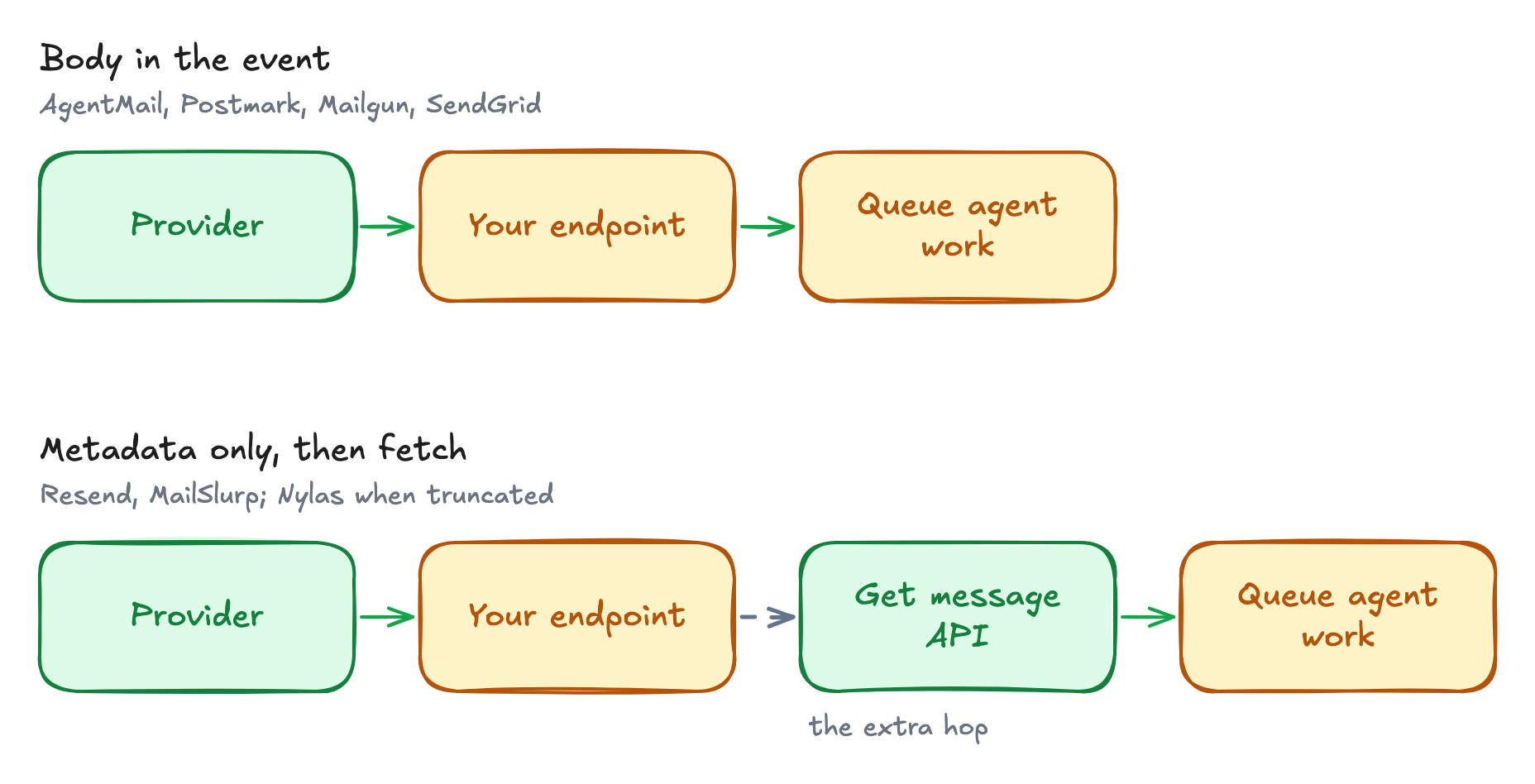
The next factor, reply extraction, determines what content the agent receives. Some providers return the sender's new text without the quoted thread, but these fields are best effort.
They may require a plain-text reply and valid reply headers, and they may be missing when parsing fails. The application should keep the original message as a fallback.
Finally, thread ownership determines how much conversation state stays in the application. AgentMail and Nylas maintain message and thread objects.
Most route and webhook services return headers and leave the application to store the conversation and construct the reply. Provider-managed replies remove that work.
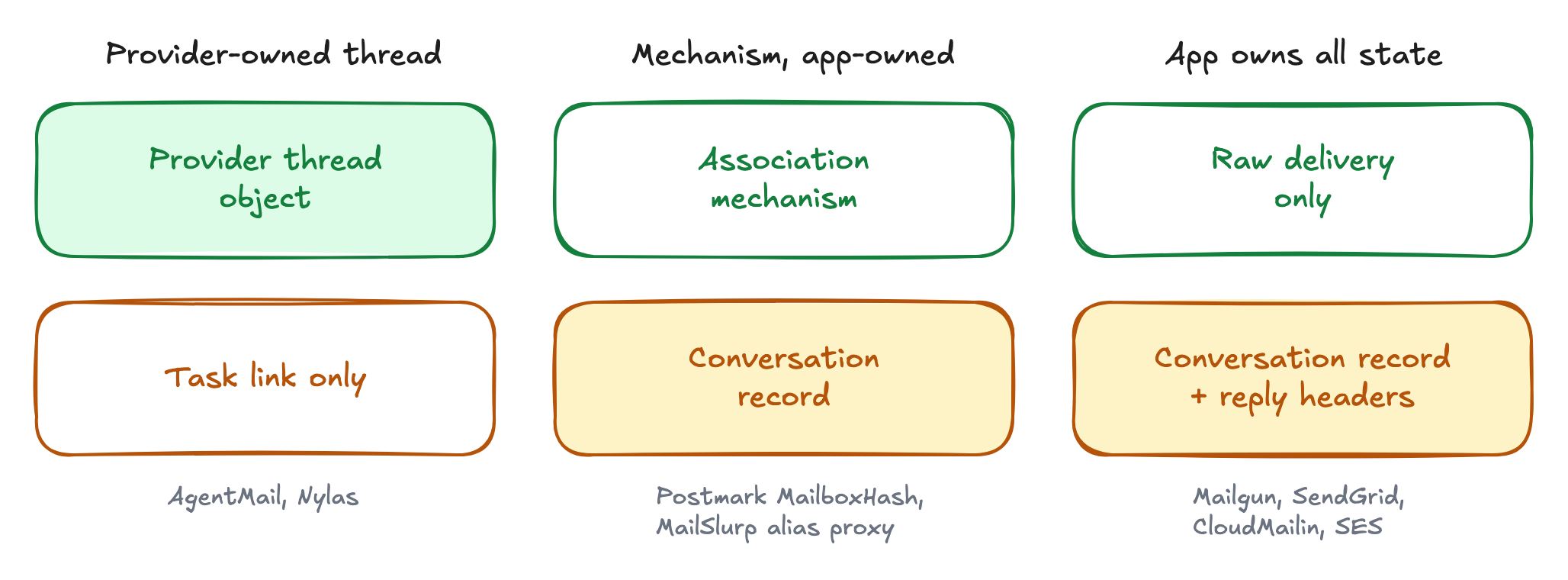
An inbound API can prepare the message for the agent. The application still decides what the agent may do with it and handles duplicate events.
| Provider | Inbox provisioning | How mail arrives | New reply on its own | Who owns the thread | Best for |
|---|---|---|---|---|---|
| AgentMail | Yes; one API call per agent | Parsed message and thread, pushed | Yes, at ingest | Provider; one call to reply in thread | Per-agent inboxes with the least email plumbing |
| Mailtrap | Yes; API-created hosted inboxes | Webhook, then Messages API fetch | No | You; reply API sets headers | Teams already sending with Mailtrap |
| Postmark | No; generated inbound address | JSON webhook |
| You; | JSON webhooks and stripped plain-text replies |
| Mailgun | No; domain routes | Form-encoded or multipart POST |
| You | Teams already using Mailgun Routes |
| SendGrid | No; inbound hostname | Multipart form data | No | You | Existing SendGrid multipart pipelines |
| Resend | No; domain catch-all | Metadata webhook, then API fetch | No | You | Store-first, fetch-second workflows |
| Mailjet | No; one parse address per API key |
| No | You | A simple single-address Parse API |
| CloudMailin | Inbound address targets | Normalized JSON or multipart POST | reply_plain | You | Controlling SMTP accept, reject, or defer |
| Nylas | Yes; hosted Agent Accounts | Mailbox stores, then | Separate Clean Messages call | Provider, via RFC 5322 headers | Hosted or connected mailboxes plus broader communications APIs |
| MailSlurp | Yes; API-created inboxes | Poll, wait-for, or webhook with an email ID | No | Reply API, or an alias proxy | QA, testing, and disposable inboxes |
| inbound.new | Routes and catch-alls |
|
| Reply by email or thread ID | Route-based receiving with reply endpoints |
| Amazon SES | No; receipt rules | Receipt rules to Lambda, S3, or SNS | No | You | AWS teams that want to own the inbound stack |
| Gmail API | No; existing Google account | Pub/Sub history event, then API fetch | No | Gmail | Agents acting on a person's Gmail mailbox |
| DIY SMTP | You build and operate it | Your SMTP receiver and queue | No | You | Full control and unusual infrastructure requirements |
Best tools for receiving and parsing replies in AI agents
AgentMail is the best choice when each agent needs its own managed inbox and the application needs parsed inbound content, thread state, and an in-thread reply operation. The other tools here fit different boundaries. They are not ranked after AgentMail.
1. AgentMail
AgentMail is an email API designed for AI agents. It lets an application create and manage real inboxes on a shared AgentMail domain or a verified custom domain. A client ID prevents duplicate inboxes when the same agent is provisioned again.
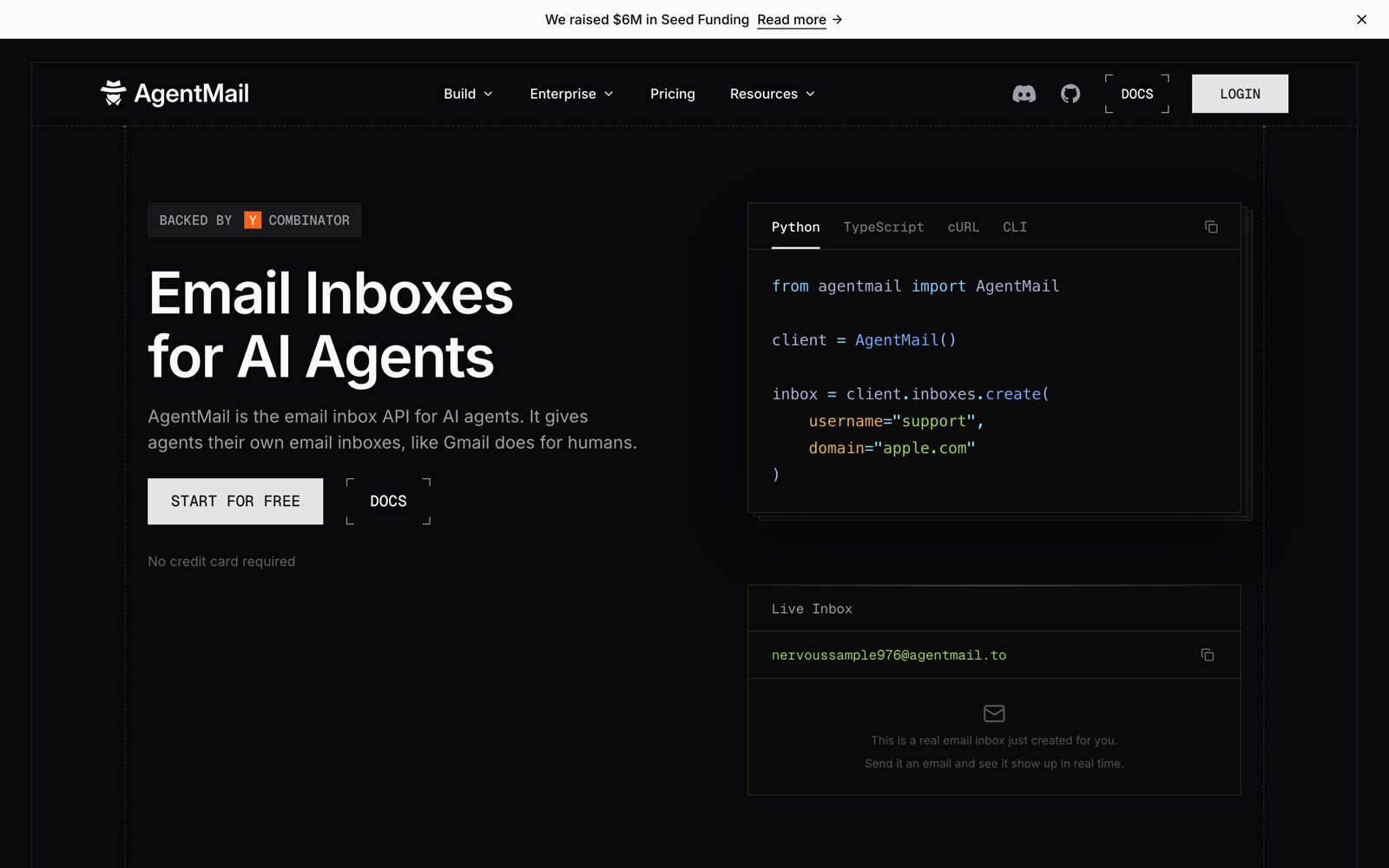
For inbound email, AgentMail gives the agent a complete receive, parse, and reply workflow. It turns incoming MIME into structured messages, stores each message in a thread, extracts the latest reply, and provides a reply operation that preserves the conversation.
- Inbox management: Create tens, hundreds, or thousands of inboxes through the API as the agent fleet grows.
- Inbound delivery: Receive
message.receivedevents through webhooks or a WebSocket connection that does not require a public endpoint. - Message parsing: Get the sender, recipients, subject, text, HTML, attachments, headers, and extracted reply content as structured fields.
- Conversation state: Receive message and thread objects, then reply against the received message without constructing email headers yourself.
Get an AgentMail API key and try the parsing and reply flow with your own inbox.
The webhook includes the message and thread, so the receive, parse, and reply loop stays small:
TypeScript
import { AgentMailClient, serialization } from 'agentmail'const client = new AgentMailClient({ apiKey: process.env.AGENTMAIL_API_KEY,})export async function POST(request: Request) { const payload: unknown = await request.json() const event = await serialization.events.MessageReceivedEvent.parse(payload) const message = event.message const content = message.extractedText ?? message.text ?? message.html ?? '' const replyText = await yourAgent.process(content) await client.inboxes.messages.reply(message.inboxId, message.messageId, { text: replyText }) return new Response(null, { status: 200 })}This compact example handles the event inline. In production, verify the webhook signature, enqueue the agent work, and return 200 OK immediately.
AgentMail fits applications where email is part of an agent's ongoing work. The application gets parsed content at an inbox that already belongs to the agent, without building its own MIME parser or email thread implementation. Create an AgentMail account to try the workflow with your own inbox.
Mailtrap
Mailtrap is an email platform for developers and product teams, with APIs for sending and receiving email. Its inbound email API creates hosted inboxes that receive mail and keep it available for later retrieval.
For AI agents, Mailtrap provides a hosted inbox created through the API. A webhook fires when mail arrives, and the message stays retrievable through the same Messages API and token used for sending.
- Inbox management: Create an @inbound-mailtrap.io address through the API with no DNS setup, then add a custom domain for production.
- Inbound delivery: Receive a webhook on arrival and fetch the parsed message as structured JSON through the Messages API.
- Reply parsing: Separate the new reply from quoted history in your application, because the payload has no stripped-reply field.
- Conversation state: Reply to a specific message with
In-Reply-ToandReferencesset, but group messages into conversations in your application.
Mailtrap fits teams that want a queryable inbox created through the API without configuring DNS first. The application still owns reply extraction and conversation grouping.
Postmark
Postmark is a transactional email service for application email. Alongside its sending API, it can receive email at a configured inbound address, parse the message, and send the result to your application as JSON.
For AI agents, Postmark is most useful when a reply belongs to a conversation your application already tracks. Its StrippedTextReply field attempts to isolate the sender's new text, which can keep the full quoted thread out of the agent's input.
- Inbound delivery: Postmark sends the parsed message to a webhook as JSON.
- Reply parsing:
StrippedTextReplyis best effort and works only for English plain-text replies withIn-Reply-ToorReferencesheaders. - Conversation state:
MailboxHashcan associate a reply with an item in your application, but your application still stores the conversation and sends the reply.
Postmark fits teams that already have a JSON webhook worker and keep conversation state in their own database. The application still needs a fallback for HTML replies or messages where StrippedTextReply is empty.
Mailgun
Mailgun is an email delivery platform with APIs for sending and receiving email. Its Routes feature matches incoming messages and forwards them to an application endpoint or another email address.
For AI agents, Mailgun works as a route from an address on your domain to an existing webhook worker. Routes send parsed message fields as form-encoded or multipart form data, including best-effort fields that may isolate the sender's new text.
- Inbound delivery: Forward a matching message to an HTTP endpoint or another email address.
- Reply parsing: Use
stripped-*fields when Mailgun finds text without quoted parts or a signature. These fields are absent when parsing fails. - Message storage: Store a matched message temporarily and retrieve it after the route runs.
- Conversation state: Keep message IDs, agent routing, thread state, and reply headers in your application.
Mailgun fits teams that already use Routes and can handle missing stripped fields. It provides the inbound boundary, while the application continues to own the conversation.
SendGrid
Twilio SendGrid is an email delivery service for transactional and marketing email. Its Inbound Parse feature receives email for a dedicated hostname and converts each message into fields an application can process.
For AI agents, SendGrid removes the first layer of MIME handling by posting parsed headers, text, HTML, and attachments as multipart form data. It does not provide a documented field for the sender's new reply, so the worker needs its own cleaning step before sending content to the agent.
- Inbound setup: Point the MX record for a dedicated hostname at SendGrid's inbound service.
- Inbound delivery: Receive parsed message parts and attachments through a multipart webhook.
- Reply parsing: Extract quoted history and signatures in your application or another service.
- Conversation state: Store message relationships and construct reply headers in your application.
SendGrid fits teams that want a multipart email parser and already own the rest of the conversation workflow. The application remains responsible for reply extraction, thread state, and in-thread responses.
Resend
Resend is an email platform for developers with APIs for sending and receiving mail. It receives every message sent to a configured domain and lets the application route it by the recipient address.

For AI agents, Resend provides a store-first workflow. It sends a metadata-only webhook when mail arrives, then the worker fetches the body, headers, and attachments through the API before processing the message.
- Inbound delivery: Receive a small event first, then fetch the full message in a second request.
- Message storage: Resend stores the email before notifying the application, including when the webhook endpoint is unavailable.
- Reply parsing: Clean the fetched body in your application because the inbound event has no extracted-reply field.
- Conversation state: Route recipients, store threads, and preserve reply relationships in your application.
Resend fits workers that prefer notification first and body retrieval second. That extra fetch is part of every inbound path, and the application still supplies the reply-parsing and conversation layers.
Mailjet
Mailjet is an email platform for transactional and marketing email. Its Parse API receives mail at a generated address and forwards a structured version of the message to an application.
For AI agents, Mailjet provides the basic message parts needed to start an inbound workflow. The Parse API sends text, HTML, headers, and attachments, but the worker must separate the new reply from quoted history before giving it to the agent.
- Inbound delivery: Receive a structured payload at an application endpoint.
- Message content: Get
Text-part,Html-part, headers, and attachments. - Reply parsing: Separate the new reply from quoted history in your application.
- Conversation state: Route mail from one parse address per API key, store thread state, and construct reply headers yourself.
Mailjet fits a narrow Parse API workflow where one inbound address is enough. The application owns reply cleaning, agent routing, and the continuing conversation.
CloudMailin
CloudMailin is an inbound email service that converts incoming mail into HTTP requests for web applications. It can deliver normalized JSON or multipart data.
For AI agents, CloudMailin is useful when the worker wants normalized message data and control over whether SMTP accepts the email. Its JSON payload can include reply_plain, an extracted plain-text reply that the worker can use before falling back to the original body.
- Inbound delivery: Receive the envelope, headers, text, HTML, and attachments as normalized JSON or multipart data.
- Reply parsing: Use
reply_plainwhen CloudMailin finds a plain-text reply. Keep the original body because the provider does not publish the extraction limits. - SMTP control: Accept, reject, or defer the message through the webhook's HTTP response.
- Conversation state: Store threads and send replies from your application.
CloudMailin fits systems where normalized payloads and SMTP outcome control matter. It does not replace the application's conversation store or reply logic.
Nylas
Nylas is a communications API that provides mailbox access and hosted email accounts. Its Agent Accounts product provides hosted mailboxes that an application can create and manage through the API.
For AI agents, Nylas combines hosted inboxes, stored messages, and provider-managed threads. A sender delivers to the mailbox, Nylas stores the message, and the application receives a message.created event. Reply cleaning is available through a separate API call.
- Mailbox management: Create hosted Agent Account mailboxes through the API.
- Inbound delivery: Receive stored messages through
message.createdwebhooks. - Reply parsing: Call Clean Messages to remove signatures and quoted history. Nylas describes the result as heuristic.
- Conversation state: Let Nylas use
In-Reply-ToandReferencesheaders to attach messages to threads.
Nylas fits applications that want hosted mailboxes and thread objects and can accept a separate cleaning request. The worker should keep the original body when the heuristic removes too much or leaves quoted content behind.
MailSlurp
MailSlurp is an email API for creating programmable inboxes, commonly used for testing and automation. Applications send through the API and receive through polling, waits, or webhooks.
For AI agents, MailSlurp can provision an inbox and wait for a message that matches a workflow condition. Its receiving tools support polling, blocking waits, and queued webhooks. Webhook workers receive an email ID and fetch the message body and headers in a second call.
- Inbox management: Create permanent or disposable inboxes through the API.
- Inbound delivery: Poll, wait for a matching message, or receive an at-least-once webhook and fetch the email by ID.
- Content extraction: Use AI Transformer to map content into a schema. The receiving API does not document a deterministic quoted-reply field.
- Replies: Use the reply APIs or an alias proxy that gives each forwarded conversation a unique Reply-To inbox.
MailSlurp fits test-oriented or event-driven workflows that benefit from inbox waits and assertions. An agent worker still needs to clean quoted replies and deduplicate webhook deliveries by message ID.
inbound.new
inbound.new is a programmable email service for receiving, sending, replying, and threading messages. Applications create routes that send a specific address or a domain catch-all to an endpoint.
For AI agents, inbound.new provides parsed webhook delivery and a direct way to reply to an email or thread. The email.received event includes both parsed and raw content, so a worker can use the convenient fields while preserving a fallback.
- Inbound delivery: Route an address or catch-all to an endpoint.
- Message content: Receive text, HTML, raw content, headers, reply headers, and attachment URLs.
- Reply parsing: Read
cleanedContentwhen present. The docs do not explain its extraction method or failure conditions. - Conversation state: Reply by email ID or thread ID, with support for reply-all.
inbound.new fits route-based workflows that want a documented reply endpoint. Test cleanedContent on representative mail before making it the agent's primary input.
Gmail API
The Gmail API is Google's REST interface for Gmail and Google Workspace mailboxes. It lets an application read and manage messages, threads, labels, drafts, and attachments in an existing Google account.
For AI agents, the Gmail API is useful when the agent acts on a person's Gmail rather than owning a new address. Push notifications send a mailbox history ID through Cloud Pub/Sub, then the worker calls the Gmail API to find and fetch the changed message.
- Inbox management: Connect an existing Gmail or Workspace account through OAuth. The Gmail API does not create inboxes.
- Inbound delivery: Renew a mailbox
watch, receive a Pub/Sub notification, then fetch changes withhistory.list. - Reply parsing: Decode the message payload and remove quoted history in your application.
- Conversation state: Use Gmail's thread objects, labels, and message APIs.
Gmail API fits personal assistants and internal tools that need a user's existing Gmail context. It adds OAuth, Cloud Pub/Sub, watch renewal, and body parsing, so it is a different choice from provisioning an inbox for each agent.
Amazon SES
Amazon Simple Email Service is AWS's service for sending and receiving email. Its inbound side uses receipt rules to match recipients and route messages to Lambda, S3, or SNS.
For AI agents, SES is the low-level option for teams that want to build the inbound stack themselves. Receipt rules can start the workflow, but the application must turn raw email into usable content and maintain the conversation.
- Inbound routing: Match the SMTP envelope recipient and invoke Lambda, store the message in S3, or publish it to SNS.
- Message content: Fetch raw MIME from S3 or SNS because direct Lambda events omit the body.
- Reply parsing: Build MIME parsing, attachment handling, and quoted-reply extraction.
- Conversation state: Store message relationships and send correctly threaded replies from your application.
SES fits teams that deliberately want to own each inbound layer. With SES alone, parsing, storage, routing, threads, and reply operations stay in your application.
DIY SMTP and MIME parsing
DIY means running the inbound mail path yourself: MX records point to an SMTP receiver you operate, which accepts the message and passes raw MIME to your queue or application.
For AI agents, this route provides complete control over where messages are accepted, stored, and processed. It also makes the team responsible for every layer between the SMTP session and the agent's usable input.
- Inbox management: Build address allocation, tenant isolation, quotas, and storage.
- Inbound delivery: Operate the SMTP receiver, retries, queues, and failure handling.
- Reply parsing: Parse MIME, sanitize HTML, scan attachments, and separate new replies from quoted text.
- Conversation state: Store message IDs and construct
In-Reply-ToandReferencesheaders.
DIY SMTP fits teams with unusual compliance, data-plane, or protocol requirements that justify running email infrastructure. It offers the most control and requires the most engineering and operational ownership.
Should I use a hosted inbox API or build on SMTP?
Use a hosted inbox API when email supports the product but operating mail infrastructure does not differentiate it. The provider can provision addresses, parse and store messages, deliver events, and preserve thread state while your team focuses on agent behavior.
Build on SMTP when control over receipt, storage location, protocol behavior, or the data plane is a product requirement. Budget for MX and SMTP operations, MIME parsing, HTML and attachment safety, retries, storage, routing, spam controls, threads, and outbound reputation.
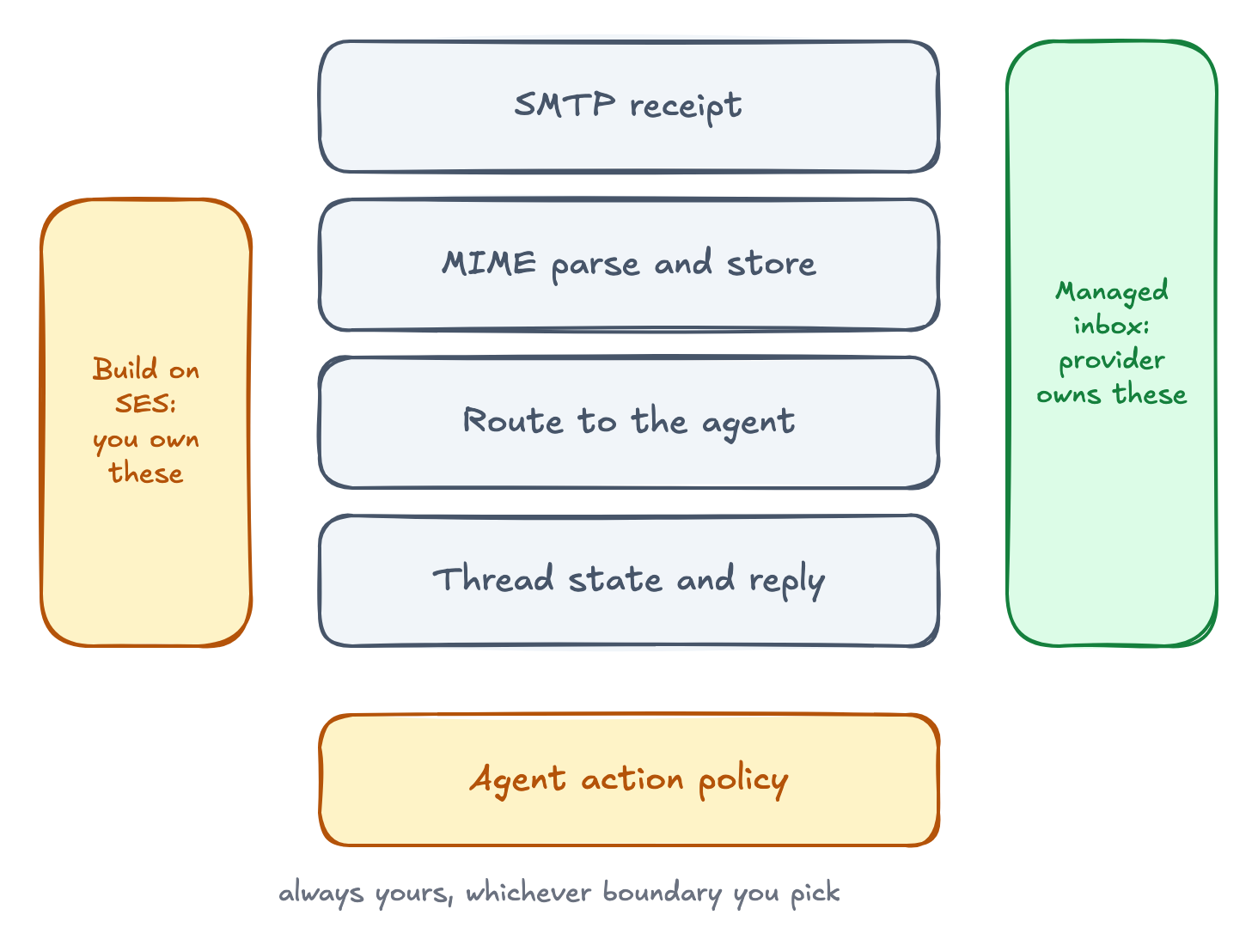
In both cases, your application still owns the agent's action policy. Email content is untrusted input even when a provider parses it cleanly.
Which tool should you choose?
Use AgentMail when email is part of your agent's work. It gives each agent a real inbox and handles the full inbound loop, including reply extraction and thread state. That removes the MIME parsing and threading layers your application would otherwise have to build.
Gmail API fits agents that act on an existing Gmail account. Webhook services fit teams with their own conversation database, while Amazon SES and DIY SMTP fit teams that want to operate more of the mail stack. AgentMail is the simpler default for agent products because one API manages the inbox and the conversation from receipt through reply.
New to agent email? Start with the complete guide.