How do you give Codex an email inbox? Create a dedicated inbox for the agent with the AgentMail API, poll that inbox until a task email arrives, write the message text to a local file, run codex exec on the file inside a sandbox, and reply to the original message ID so the answer lands in the sender's thread. The whole loop is one Node script.
Codex does its work in a terminal session. When the session ends, so does your ability to hand it anything: there is no way to send Codex a task from your phone, from a teammate's laptop, or from another system. Email is the simplest fix, because email is the one channel every person and every service already knows how to use.
This guide gives OpenAI's Codex CLI its own email address, walks a real task through it, and shows every response the API returned along the way. If you want the broader survey of coding agents and email, read How to give your AI coding agent its own email inbox. AgentMail also ships an official plugin for Codex. This article goes deep on the scripted SDK path instead: the full receive, run, and reply loop.
Why does Codex need an email address?
An email address is the one endpoint that both people and other systems can already reach without any setup. A teammate can forward a task from their phone, a cron job can send one from a server, and a colleague can reply from whatever mail client they use, all to the same address, with the answer landing back in the same thread. A terminal session cannot offer that, because it exists only while it is open, on one machine. The inbox is what gives Codex a durable, shared front door.
Give the agent a dedicated address of its own, like codex-agent@agentmail.to, rather than access to a person's mailbox. A dedicated inbox is created by your code with one API call, is scoped to the workflow that owns it, and can be deleted the moment it is no longer needed. Connecting a personal Gmail or Outlook account does the opposite: it hands the agent someone's entire mail history along with OAuth scopes, and there is no clean way to tear that down.
Codex CLI has no email features of its own. The pattern in this guide is a small script that sits between the inbox and the agent. The script receives the email, turns it into a file, asks Codex to work on the file in a sandbox, and emails the result back. Codex never talks to the mail server, which keeps the agent's permissions narrow and the flow easy to reason about.
What you'll build
One Node script, agent-inbox.mjs. It creates an inbox, prints the address, and waits. You email that address a task from anywhere. The script receives the message, runs Codex on it, replies in the same email thread, and deletes the inbox when it is done.
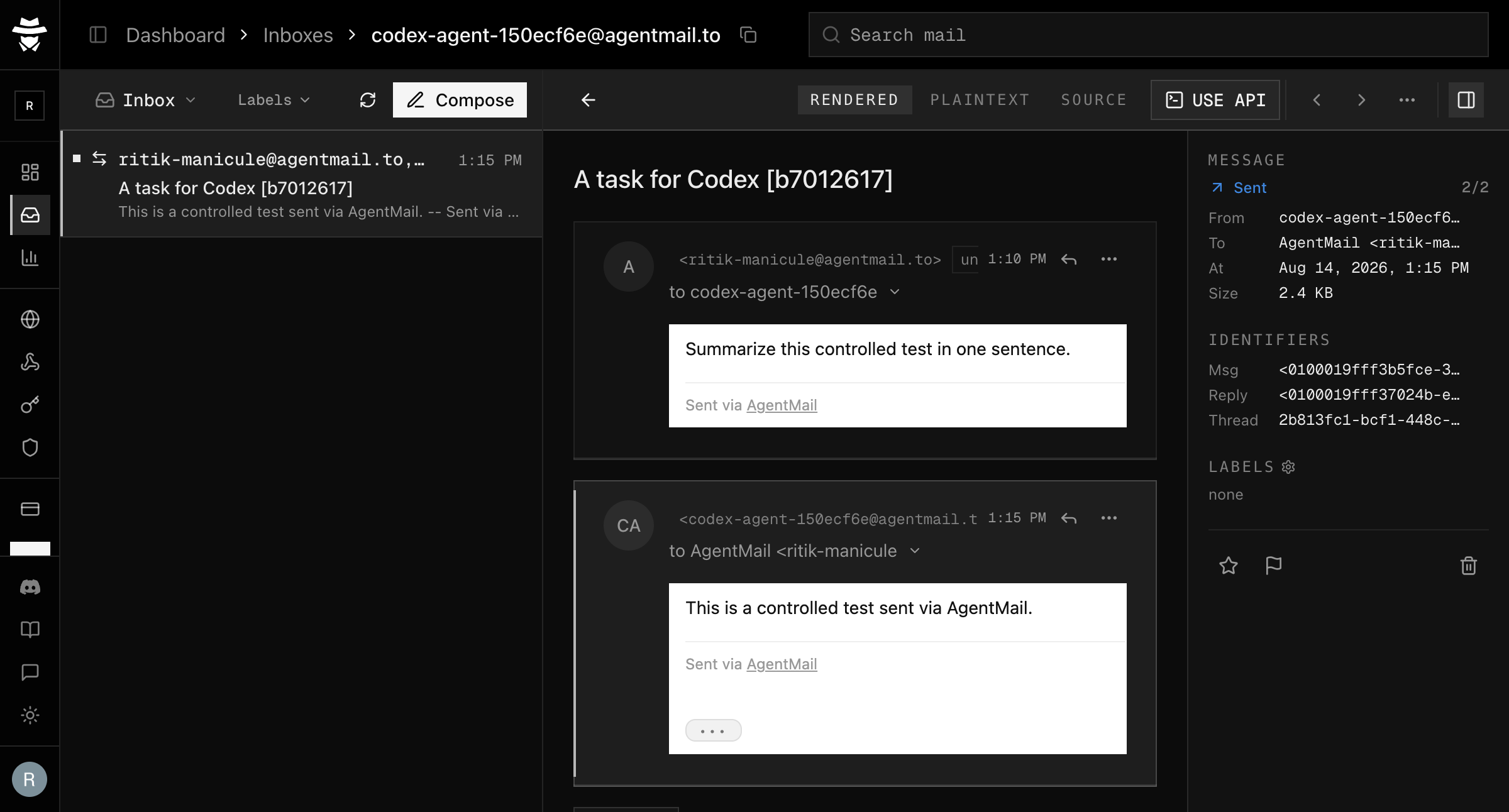
The finished loop in the AgentMail dashboard: the task email and Codex's reply in the same thread.
Prerequisites
- Node.js 18 or newer. The recorded run used v24.12.0.
- An AgentMail API key. The free tier includes three inboxes, which is more than this guide needs.
- Codex CLI, authenticated with your OpenAI account.
Install and authenticate Codex CLI if you have not already:
bun add --global @openai/codex
printenv OPENAI_API_KEY | codex login --with-api-key
Create a folder, install the AgentMail SDK, and export your key:
mkdir codex-inbox && cd codex-inbox
bun init -y && bun add agentmail
export AGENTMAIL_API_KEY="your-key-here"
How do you build the loop?
Six steps, each a few lines of code. The finished script is at the end if you would rather read it whole.
1. Give the agent an AgentMail inbox
The inbox gives people a stable address for the agent. One call creates it:
import { AgentMailClient } from "agentmail";
import { randomUUID } from "node:crypto";

const client = new AgentMailClient({ apiKey: process.env.AGENTMAIL_API_KEY });

const runTag = randomUUID().slice(0, 8);
const inbox = await client.inboxes.create({
  username: `codex-agent-${runTag}`,
  displayName: "Codex Agent",
});
The response, trimmed to the fields the script uses:
{
  "inboxId": "codex-agent-150ecf6e@agentmail.to",
  "email": "codex-agent-150ecf6e@agentmail.to",
  "displayName": "Codex Agent",
  "createdAt": "2026-08-14T07:39:12.099Z"
}
The email is the address the world sees, and the inboxId identifies the inbox in every later API call. For @agentmail.to inboxes the two are the same string.
Pass an explicit username. Auto-generated usernames can collide with existing inboxes and fail with 403 resource_taken. Keep the displayName to plain words, because punctuation such as parentheses fails validation. A newly created inbox can also take a moment to become visible to the message endpoints, so treat a 404 in the first seconds after creation as retryable.
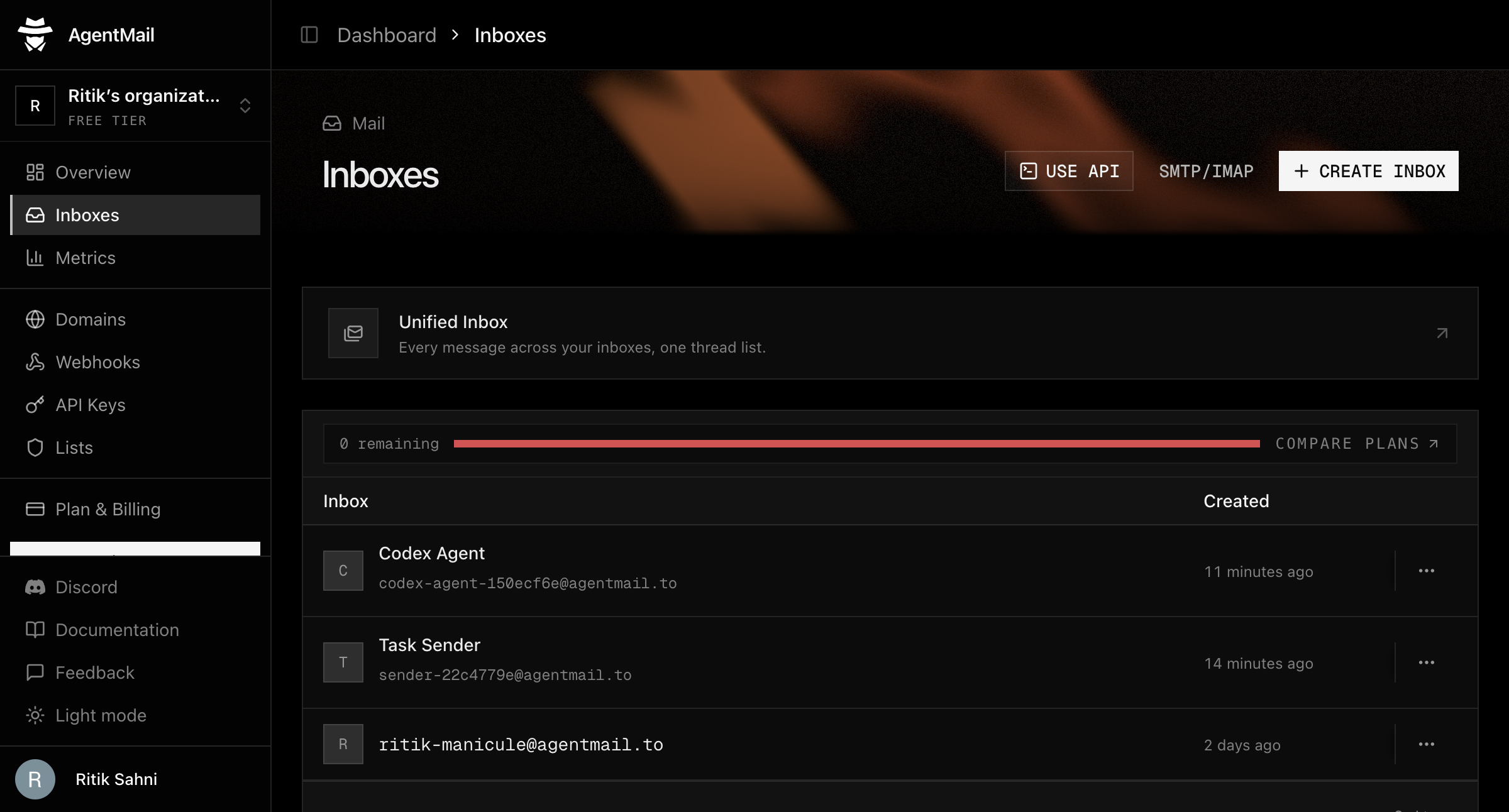
The new inbox in the AgentMail dashboard.
2. Send it a task
A task is any email. A mail client works; the recorded run sent one from another inbox in the same account through the API:
await client.inboxes.messages.send(
  "sender-inbox@agentmail.to",   // the sender inbox, standing in for a person
  {
    to: [inbox.email],
    subject: `A task for Codex [${runTag}]`,
    text: "Summarize this controlled test in one sentence.",
  },
  { idempotencyKey: `send-${runTag}` },
);
The response:
{
  "messageId": "<0100019fff37024b-e087ee00-dd5a-4143-8020-7634a184bcc8-000000@email.amazonses.com>",
  "threadId": "343f2f15-7bbb-4634-bcd9-3f93fecc2ca1"
}
The idempotencyKey makes retries safe. If the same request runs twice because of a network failure or an interrupted process, AgentMail returns the original result instead of sending a second email. Every send in this guide carries one.
3. Poll for the received message
Polling means asking on a schedule. The agent's side starts with a loop that lists the inbox every few seconds until a received message appears:
let task = null;
while (!task) {
  const { messages } = await client.inboxes.messages.list(inbox.inboxId, {});
  task = messages.find((m) => m.labels.includes("received")) ?? null;
  if (!task) await sleep(3000);
}
The first poll came back empty:
{ "count": 0, "messages": [] }The next one returned the message, trimmed here to the fields that matter:
{
  "count": 1,
  "messages": [
    {
      "inboxId": "codex-agent-150ecf6e@agentmail.to",
      "threadId": "2b813fc1-bcf1-448c-a7d7-b57044529158",
      "messageId": "<0100019fff37024b-e087ee00-dd5a-4143-8020-7634a184bcc8-000000@email.amazonses.com>",
      "labels": ["received", "unread"],
      "timestamp": "2026-08-14T07:40:22.000Z",
      "from": "AgentMail <sender-inbox@agentmail.to>",
      "to": ["codex-agent-150ecf6e@agentmail.to"],
      "subject": "A task for Codex [b7012617]",
      "preview": "Summarize this controlled test in one sentence.\n\n--\nSent via AgentMail"
    }
  ]
}
Two lines in that snippet are doing more work than they appear to.
The first is the labels check. An inbox holds mail moving in both directions, the way your own mail account holds an inbox folder and a sent folder, and list returns both. A message the agent received carries the received label; a message the agent sent carries sent. The loop only wants inbound mail, so it selects on received. Without that check, the script could pick up the agent's own outgoing reply later and treat it as a new task.
The second is the empty {} where filters could go. There are two ways to read an inbox, and they update at different speeds. A plain list reads the mailbox directly, so a delivered message appears on the next poll. A filtered list, using subject, from, or to, is answered by a search index that is built in the background after delivery, so it can still report an empty inbox after the message has arrived. Poll the plain list and do the matching in your own code.
4. Run Codex on the task
The list returns previews. get returns the full message:
const message = await client.inboxes.messages.get(inbox.inboxId, task.messageId);{
"from": "AgentMail <sender-inbox@agentmail.to>",
"subject": "A task for Codex [b7012617]",
"labels": ["received", "unread"],
"text": "Summarize this controlled test in one sentence.\n\n--\nSent via AgentMail"
}Note the body. AgentMail appends a Sent via AgentMail footer to message text, so the agent reads the email as delivered, not the string the sender typed. Write the text to a file and run Codex on it:
writeFileSync(path.join(workDir, "task.txt"), message.text ?? "");

const codex = spawnSync("codex", [
  "exec",
  "--skip-git-repo-check",
  "--sandbox", "workspace-write",
  "Read task.txt and write a one-sentence answer to result.txt. Do not run network commands.",
], { cwd: workDir, encoding: "utf8", timeout: 300_000 });
codex exec runs Codex without an interactive session, and the sandbox flag controls what it may touch while it works. The flag matters. A read-only sandbox blocks the result.txt write, and the run produces no answer; Codex reports patch rejected: writing is blocked by read-only sandbox. workspace-write lets Codex create files in its working directory and uses Codex's default of no network access, so the restriction is enforced by the sandbox instead of relying only on the prompt. Keep that setting disabled: if you enable network access in Codex configuration, this command inherits it.
Codex's own trace from the run, with personal identifiers and workstation paths redacted and local plugin noise removed:
OpenAI Codex v0.147.0
--------
workdir: <working-directory>
model: gpt-5.6-sol
provider: openai
approval: never
sandbox: workspace-write [workdir, /tmp, $TMPDIR]
reasoning effort: medium
reasoning summaries: none
session id: <redacted>
--------
user
Read task.txt and write a one-sentence answer to result.txt. Do not run network commands.
codex
I’ll read the repository instructions and task, then write exactly one sentence to `result.txt` without network access.
exec
/bin/zsh -lc "pwd && rg --files -g 'RTK.md' -g 'task.txt' -g 'result.txt' -g 'AGENTS.md'" in <working-directory>
 succeeded in 0ms:
<working-directory>
task.txt

exec
/bin/zsh -lc "sed -n '1,200p' task.txt" in <working-directory>
 succeeded in 0ms:
Summarize this controlled test in one sentence.

--
Sent via AgentMail
apply patch
patch: completed
<working-directory>/result.txt
diff --git a/result.txt b/result.txt
new file mode 100644
index 0000000000000000000000000000000000000000..009ce1f822214ea2527352a8ac8bbd16a1d632fb
--- /dev/null
+++ b/result.txt
@@ -0,0 +1 @@
+This is a controlled test sent via AgentMail.

diff --git a/result.txt b/result.txt
new file mode 100644
index 0000000000000000000000000000000000000000..009ce1f822214ea2527352a8ac8bbd16a1d632fb
--- /dev/null
+++ b/result.txt
@@ -0,0 +1 @@
+This is a controlled test sent via AgentMail.

exec
/bin/zsh -lc "sed -n '1,5p' result.txt && test \""'$(wc -l < result.txt | tr -d '"' ')\" -eq 1" in <working-directory>
 succeeded in 0ms:
This is a controlled test sent via AgentMail.

diff --git a/result.txt b/result.txt
new file mode 100644
index 0000000000000000000000000000000000000000..009ce1f822214ea2527352a8ac8bbd16a1d632fb
--- /dev/null
+++ b/result.txt
@@ -0,0 +1 @@
+This is a controlled test sent via AgentMail.

codex
Wrote the one-sentence answer to [result.txt](<working-directory>/result.txt).
diff --git a/result.txt b/result.txt
new file mode 100644
index 0000000000000000000000000000000000000000..009ce1f822214ea2527352a8ac8bbd16a1d632fb
--- /dev/null
+++ b/result.txt
@@ -0,0 +1 @@
+This is a controlled test sent via AgentMail.

tokens used
18,693
Codex reads task.txt, writes the answer as a patch, and checks that result.txt is exactly one line:
This is a controlled test sent via AgentMail.The answer mentions AgentMail because of the footer. Codex summarized the file as delivered.
5. Reply in the thread
The answer goes back with a message-scoped reply, routed by the original messageId:
await client.inboxes.messages.reply(
  inbox.inboxId,
  message.messageId,
  { text: answer },
  { idempotencyKey: `reply-${runTag}` },
);
{
"messageId": "<0100019fff3b5fce-3121d35a-81c4-44e0-8695-67fefb0657fb-000000@email.amazonses.com>",
"threadId": "2b813fc1-bcf1-448c-a7d7-b57044529158"
}The threadId matches the received message's thread. Replying to the fetched messageId keeps the response in the sender's existing conversation, which is what the dashboard screenshot at the top of this guide shows. How to implement email threading in an AI agent covers the threading model in depth.
6. Clean up
Deletion is one call, and it belongs in a finally block so it runs even when an earlier step throws:
} finally {
  await client.inboxes.delete(inbox.inboxId);
}
Inbox limits make this matter. The free tier allows three inboxes, and leaked test inboxes block the next run with 403 limit_exceeded.
Run it
The complete script, agent-inbox.mjs. It hard-codes no secrets and cleans up after itself:
// agent-inbox.mjs: give Codex an email inbox.
// Creates an inbox, waits for an email to arrive, runs Codex on it in a
// sandbox, replies on the same thread, and deletes the inbox when done.

import { AgentMailClient } from "agentmail";
import { spawnSync } from "node:child_process";
import { randomUUID } from "node:crypto";
import { mkdirSync, readFileSync, writeFileSync } from "node:fs";
import path from "node:path";

const client = new AgentMailClient({ apiKey: process.env.AGENTMAIL_API_KEY });
const sleep = (ms) => new Promise((r) => setTimeout(r, ms));

// 1. Give the agent an address. An explicit username avoids collisions
//    with auto-generated names.
const runTag = randomUUID().slice(0, 8);
const inbox = await client.inboxes.create({
  username: `codex-agent-${runTag}`,
  displayName: "Codex Agent",
});

try {
  console.log(`Your agent's address: ${inbox.email}`);
  console.log("Send it an email with a task. Waiting...");

  // 2. Wait for a task to arrive. Plain list + client-side label check:
  //    the filtered list endpoints are served by a search index that can
  //    lag behind fresh deliveries.
  let task = null;
  for (let i = 0; i < 200 && !task; i++) {
    const { messages } = await client.inboxes.messages.list(inbox.inboxId, {});
    task = messages.find((m) => m.labels.includes("received")) ?? null;
    if (!task) await sleep(3000);
  }
  if (!task) throw new Error("No email arrived within 10 minutes.");
  console.log(`Task received from ${task.from}: "${task.subject}"`);

  // 3. Fetch the full message and hand it to Codex as a local file.
  const message = await client.inboxes.messages.get(
    inbox.inboxId,
    task.messageId,
  );
  const workDir = path.join(process.cwd(), "codex-work");
  mkdirSync(workDir, { recursive: true });
  writeFileSync(path.join(workDir, "task.txt"), message.text ?? "");

  // 4. Let Codex work. workspace-write lets it create result.txt while
  //    using Codex's default of no network access.
  const codex = spawnSync(
    "codex",
    [
      "exec",
      "--skip-git-repo-check",
      "--sandbox",
      "workspace-write",
      "Read task.txt and write a one-sentence answer to result.txt. Do not run network commands.",
    ],
    { cwd: workDir, encoding: "utf8", timeout: 300_000 },
  );
  if (codex.status !== 0) throw new Error(`codex exec failed: ${codex.stderr}`);

  const answer = readFileSync(path.join(workDir, "result.txt"), "utf8").trim();
  if (!answer) throw new Error("result.txt is empty.");
  console.log(`Codex's answer: "${answer}"`);

  // 5. Reply on the same thread. The idempotency key means a retried
  //    request can never send a duplicate email.
  await client.inboxes.messages.reply(
    inbox.inboxId,
    message.messageId,
    { text: answer },
    { idempotencyKey: `reply-${runTag}` },
  );
  console.log(`Replied to ${message.from} on thread ${message.threadId}`);
} finally {
  // 6. Clean up. This was a demo inbox; keep it if you want the address.
  await client.inboxes.delete(inbox.inboxId);
  console.log(`Deleted ${inbox.email}`);
}
Run it, then email the address it prints from anywhere:
node agent-inbox.mjsIn the recorded run, we emailed the agent one question and the script exited 0:
$ node agent-inbox.mjs
Your agent's address: codex-agent-6b0c1d4a@agentmail.to
Send it an email with a task. Waiting...
Task received from AgentMail <sender-inbox@agentmail.to>: "A question for Codex"
Codex's answer: "An AI agent should have its own email inbox so it can securely receive, organize, and act on messages independently while keeping its communications separate and auditable."
Replied to AgentMail <sender-inbox@agentmail.to> on thread f3ed776c-5c69-45bd-bbcf-178124e95d6f
Deleted codex-agent-6b0c1d4a@agentmail.to

$ echo $?
0
What should you harden before real email reaches Codex?
The recorded run was a closed loop with a known sender and a known task. A real inbox is an open channel that anyone can email, so add four controls before pointing this at the world.
Treat email bodies as data, not instructions. Inbound email can carry prompt injection, which is when a message tries to smuggle new instructions to the agent reading it. Validate the sender before any content reaches Codex, and put extracted content inside a task template that fixes what the task may do.
Deduplicate before scheduling. Email delivery can repeat. Record each messageId before creating work, and skip any ID you have already processed, so repeated delivery cannot create duplicate tasks.
Keep send authority in the application. Codex writes a file, and your code decides whether that file becomes an email or waits as a draft for a person to review. Unfamiliar senders and unfamiliar requests should default to the draft path.
Scope the API key. AgentMail permissions are granular, and omitting the permissions object grants all permissions. This guide's loop needs exactly four:
const permissions = {
  inboxCreate: true,
  inboxDelete: true,
  messageRead: true,
  messageSend: true,
};
For a deployed agent, also replace polling with a message.received webhook, so AgentMail pushes mail to your app instead of your app asking for it. The inbox, fetch, and reply flow stay the same.