GTM Engineering with Clay: 3 Email Workflows You Can Build in an Afternoon

Three Clay + AgentMail GTM workflows you can build without code this week: reply-based outbound, AI SDR on deal threads, and a signal inbox that turns forwarded email into enriched rows.
- gtm-engineering
- clay
- integrations
- workflow
- developer-resources
GTM engineering is the practice of turning go-to-market work into systems: triggers, enrichment, reasoning, routing, and actions that run continuously instead of living in one rep's tabs. Here are three Clay + AgentMail workflows you can build in an afternoon, with copy-paste prompts and no code required.
TL;DR: With Clay and AgentMail you can build three GTM workflows without code: (1) reply-based outbound automation, where every cold-email reply is captured, classified, and answered from the table; (2) AI SDR email automation that lives on your deal threads via cc and drafts the follow-ups; (3) a signal inbox that turns forwarded lists, intros, and alerts into enriched Clay rows. Setup for each is a subdomain, an inbox, and Clay's native AgentMail source and actions.
What is GTM engineering?
GTM engineering is go-to-market work treated like a product surface. Instead of asking reps to manually watch inboxes, copy data between tools, remember every follow-up, and route every signal, you define the system once: what event starts the workflow, what data gets enriched, what an agent should reason about, what should be routed to a human, and what action should happen next.
In Clay, that system usually starts as a table. Clay handles enrichment, waterfall providers, AI columns, and Claygents. AgentMail adds the missing email layer: a real inbox that can receive replies as rows and send or draft responses from the same workflow. That is why Clay + AgentMail fits GTM engineering. The table can both understand the market and act back into it.
Most GTM teams already run half their motion inside Clay: finding accounts, enriching contacts through a waterfall of providers, writing a line of personalization per row. The half that still lives outside the table is email. Outbound goes out through a sequencer, replies land in somebody's inbox, and the signal your whole motion depends on never makes it back to the system that started it.
AgentMail closes that gap as a native Clay integration: inbound email becomes rows in your table, and replies go back out as native actions. That turns a set of GTM jobs that used to need a patchwork of tools into workflows you build once and run continuously. Below are three Clay + AgentMail workflows you can build this week.
What stack do you need for Clay + AgentMail workflows?
Two pieces, and you already know the first. Clay is the workbench: the table, the enrichment waterfall, AI columns, and Claygents that research and write per row. AgentMail is the email layer: real, programmable inboxes on your own subdomain, wired into Clay natively. As a source, "Import AgentMail message events" turns every message an inbox receives into a new row in real time (sender, subject, body, timestamps), with the webhooks created for you. As actions, "Reply" sends from the table and "Create draft" stages a response for human approval.
You will not write code for any of these workflows. Clay also ships an agent that builds workflows from a prompt, so you can describe any of the three below in a sentence and refine from what it assembles.
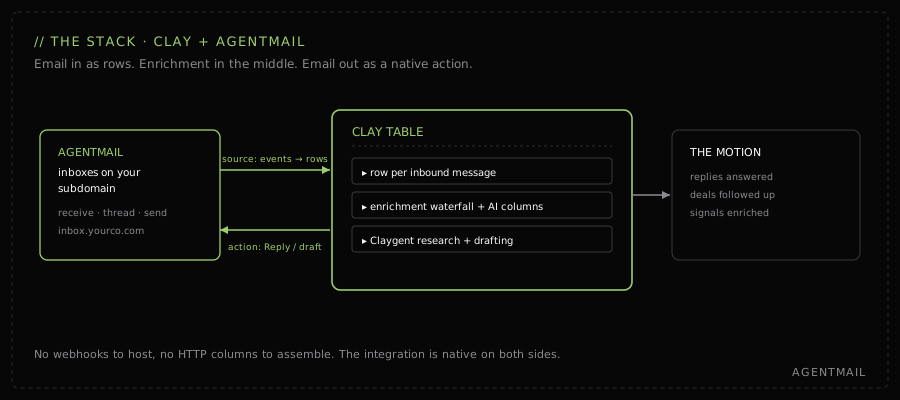
The GTM stack: an AgentMail inbox feeds message events into a Clay table as rows; enrichment and AI columns process them; native Reply and Create draft actions send email back out.
How does Clay + AgentMail compare with other GTM automation providers?
No tool category is bad. They just optimize for different jobs. The comparison that matters for GTM engineering is whether the provider can make email a first-class trigger and action inside the same system where enrichment and reasoning happen.
| Provider type | Examples | What it's good at | Where it breaks for GTM engineering | Why Clay + AgentMail is different |
|---|---|---|---|---|
| Sequencer-first outbound | Outreach, Salesloft, Apollo-style | Sending campaigns and stopping when someone replies | The reply often leaves the system and becomes manual inbox work | Replies land back in Clay as rows, so classification, enrichment, routing, and follow-up happen in the same system |
| CRM workflow automation | HubSpot, Salesforce-style | Updating lifecycle stages and assigning tasks | Usually reacts after a human or another tool has already interpreted the email | The inbound message itself is the trigger, with the full body available for AI reasoning |
| Generic automation builders | Zapier, Make, n8n-style | Moving fields between tools | Need hand-built webhooks, email parsing, and separate deliverability decisions | AgentMail is native in Clay as both source and action, so the inbox is part of the GTM table |
| Packaged AI SDR platforms | AISDR-style platforms | Running a complete sales-development motion | Effective when you want the whole motion owned for you, less flexible when Clay is already your workbench | You keep Clay as the operating layer and use AgentMail for the email identity, threading, replies, and drafts |
That last row matters because AI SDR email automation is a real category now. AISDR, an AgentMail customer, shows the scale of the pattern: high-volume sales agents need authenticated domains, many inboxes, reply handling, and a system that can keep email operational without a human in every loop. This guide covers the build-it-in-Clay version of that pattern.
How do you automate replies to cold email in Clay?
Sending cold email at volume is a solved problem. What breaks at volume is the return path: the positive reply that sits for six hours, the referral that never gets routed, the out-of-office that a sequencer counts as engagement. This workflow captures every cold-email reply in your Clay table, classifies it, and answers it, with a human approving anything that matters.
- Point a subdomain at AgentMail. Add the DNS records for
inbox.yourco.comso reply traffic never touches your primary domain's reputation. - Create the sending inbox. One call or one click in the dashboard:
outbound@inbox.yourco.com. This is the address your campaigns send from, and every reply lands in it already threaded. - Connect the source in Clay. New table → Sources → search AgentMail → Import AgentMail message events. Paste your API key, pick the inbox and the "message received" event. Clay creates the webhooks for you.
- Add a classification column. An AI column that labels each inbound row: positive, not interested, out-of-office, referral, needs follow-up. This label is what routes the row.
Copy-paste Claygent prompt for the classifier:
Code
You are classifying a reply to a cold outbound email. Read the latest inbound email, the subject line, and any available thread context. Return one label only: positive, referral, not_interested, out_of_office, objection, unsubscribe, or needs_human. Use positive only when the sender shows buying intent, asks for next steps, asks for pricing, asks to meet, or introduces a relevant stakeholder. Use referral when they point us to someone else. Use needs_human when the message is ambiguous, angry, legal/compliance-related, or contains more than one intent.After the classifier:
- Enrich the replier. Run your usual waterfall on the sender's domain and name, so the row carries company size, funding, and role by the time anyone looks at it.
- Route with native actions. Out-of-office triggers a Reply with a scheduled re-touch. Referral triggers a Reply thanking them, plus a new row for the referred contact. Positive triggers a Create draft, written by a Claygent from the enriched row, staged for the rep to approve and send.
Because the reply goes out through the same thread, the prospect's next message lands back in the table as a new row and the loop keeps running. The rep's job shrinks to approving drafts on the rows that deserve a human.
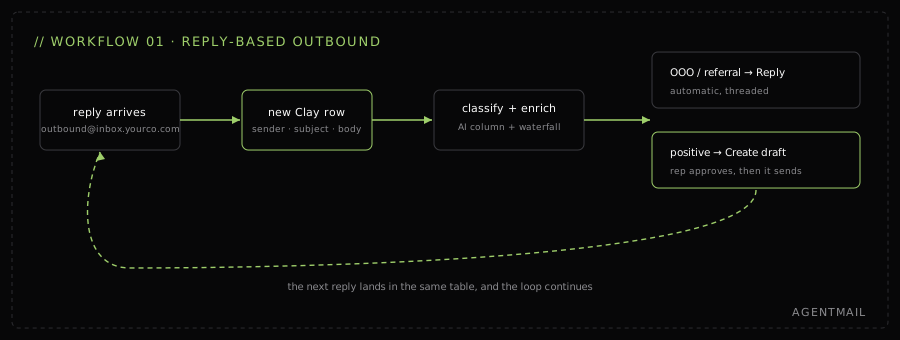
Reply-based outbound automation: a cold email reply becomes a Clay row, is classified and enriched, then routed to auto-reply or a human-approved draft.
How do you build an AI SDR with Clay?
Most deals do not die from a bad pitch. They die from a follow-up that never went out. The AI SDR pattern here is deliberately narrow: the agent does not open conversations, it keeps them alive. A rep cc's the agent's inbox onto a live thread, and from then on the thread has a system of record and a drafter that never forgets. If you are searching for the best AI SDR for follow-ups, this is the workflow to study first because it keeps the rep in control while letting the agent watch every thread.
- Create the agent's inbox.
deals@inbox.yourco.com. Give it a human-readable name, because prospects will see it on the thread. - Connect it as a Clay source. Same "Import AgentMail message events" source as workflow 01, pointed at this inbox. Every message on any thread it is cc'd on becomes a row.
- Cc the agent on a live deal. That is the whole onboarding for a thread. The full back-and-forth starts accumulating in the table, threaded per deal.
- Add a thread-state column. A Claygent reads the conversation so far and keeps a running summary: last touch, who owes whom a reply, committed next step, and days since the counterparty went quiet.
Copy-paste Claygent prompt for thread state:
Code
You are the deal-thread state tracker for an AI SDR. Read the full email thread and return structured fields: last_meaningful_touch_date, current_owner, prospect_intent, committed_next_step, next_step_due_date, blockers, risk_level, and recommended_follow_up. If the prospect owes us a reply, say so. If we owe the prospect a reply, say so. If the thread is closed, disqualified, or unsafe to automate, mark recommended_follow_up as none and explain why in one sentence.After the state tracker:
- Draft the follow-up. When "days quiet" crosses your threshold, a Claygent writes the nudge from the thread summary and the enriched account row, and Create draft stages it in the agent's inbox.
- Rep approves, agent sends. The draft goes out on the same thread, from the address the prospect already knows. The reply comes back as the next row.
The same table gives sales leadership something they have never had from a sequencer: every active deal thread, its state, and its next step, in rows they can filter. This is the pattern AgentMail ships as the GTM Agent template on the Build page. The template is listed under Outbound as "Personalised outreach, reply classification, warm-ack + handoff," which makes it the obvious starting point if you want a running start.
AI SDR on deal threads: a rep ccs the agent inbox on a deal thread, messages accumulate as rows, a Claygent tracks thread state and drafts follow-ups for rep approval.
How do you turn GTM signals into enriched Clay rows?
Every GTM team swims in signals that arrive as email and die as email: a newsletter naming twelve target accounts, an intro from an investor, an event attendee list, a funding alert, a job-change notification. Each one is pipeline, and each one currently depends on whoever received it having a spare twenty minutes. This workflow gives the whole team one address to forward those to, and the table does the rest.
- Create the signal inbox.
signals@inbox.yourco.com. Share it with the team with one instruction: anything that smells like pipeline, forward it here. - Connect it as a Clay source. Each forwarded email becomes a row with the full body intact, which is exactly what an extraction column needs.
- Extract the entities. An AI column pulls every person and company named in the forward: the accounts in the newsletter, the person being introduced, the attendees on the list.
- Write them out as their own rows. Use a write-to-table step so each extracted person or company lands in your master accounts table, one row each, tagged with the signal that produced it.
- Enrich and route. The waterfall fills in the contact and firmographics, a fit column scores them against your ICP, and qualifying rows flow into the outbound motion from workflow 01.
The forwarding habit takes a week to build and then the funnel has a new top. Nothing the team already reads changes; the only new behavior is a forward.
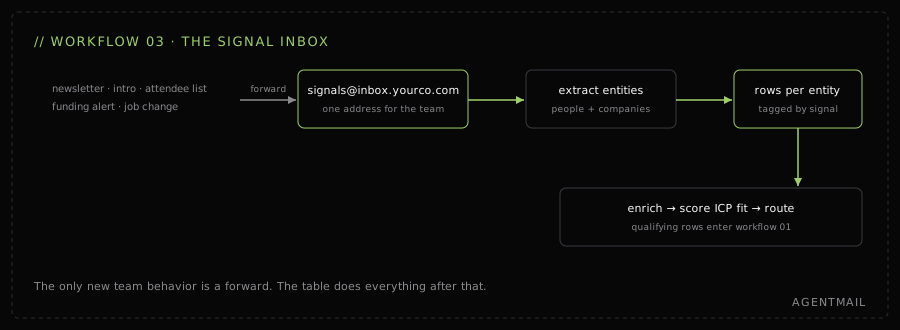
Signal inbox workflow: team forwards newsletters, intros, and alerts to a signal inbox; Clay extracts the people and companies, enriches them, and routes ICP fits into outbound.
Which Clay + AgentMail workflow should you build first?
| If your bottleneck is | Build | Time to live | First win |
|---|---|---|---|
| Replies sitting unanswered, positive ones included | 01 · Reply-based outbound | An afternoon | Every reply classified and routed the day it lands |
| Deals going quiet because follow-ups slip | 02 · AI SDR on the thread | An afternoon, then cc as you go | No thread more than N days quiet without a staged draft |
| Good signals dying in personal inboxes | 03 · Signal inbox | An hour, plus a team habit | Forwarded lists become enriched, scored accounts |
They compound in that order: 03 feeds new accounts into 01, and threads that 01 opens graduate into 02. Two use cases from the same integration did not make this list on search demand alone, and they are worth knowing: email-native meeting prep (forward a thread, get an account brief) and a team command inbox (email the table instructions like "enrich these companies"). Both are variations on workflow 03's extract-and-route shape.
How do you keep the sending reputation yours?
All three workflows send from inboxes on your own subdomain, and that is by design. Mailbox providers score sending reputation at the domain level, so inbox.yourco.com carries the outbound motion's reputation while your primary domain carries billing and product mail, and neither can drag down the other. If you run GTM for more than one brand, give each its own subdomain so their reputations never mix.
Get started
AgentMail gives your GTM motion real inboxes. Create one on your subdomain, connect it to Clay as a native source, and build any of the three workflows above this week. Or start from the GTM Agent template. Free to start.