- The app: Give a support agent an AgentMail inbox. The agent prepares a draft for routine questions and labels sensitive messages for a teammate to review.
- The stack: AgentMail receives the email and keeps the labels and drafts with the conversation. OpenAI classifies each message, application code decides whether to create a draft, and SQLite makes retries reuse the first decision.
- The code: Clone the complete implementation and follow the steps below to run it with your own inbox.
What you'll build
I wanted to automate as much of my support job as I could while keeping a person in the loop. Routine questions should get replies based on the best approved answer the agent can find, while billing, account access, and other sensitive topics should go to a person.
I chose AgentMail because it gives the agent its own inbox while keeping every conversation visible to the support team. The labels and reply draft stay with the customer's message, so a teammate has the context to review each reply before sending it. For this article, I did not give the agent permission to send email. AgentMail lets you enable Message Send or Draft Send in the API key options if you want your workflow to send replies automatically.
When a customer writes to the AgentMail address, the model returns a category, priority, summary, and optional knowledge article. The app uses that classification to choose one of two outcomes:
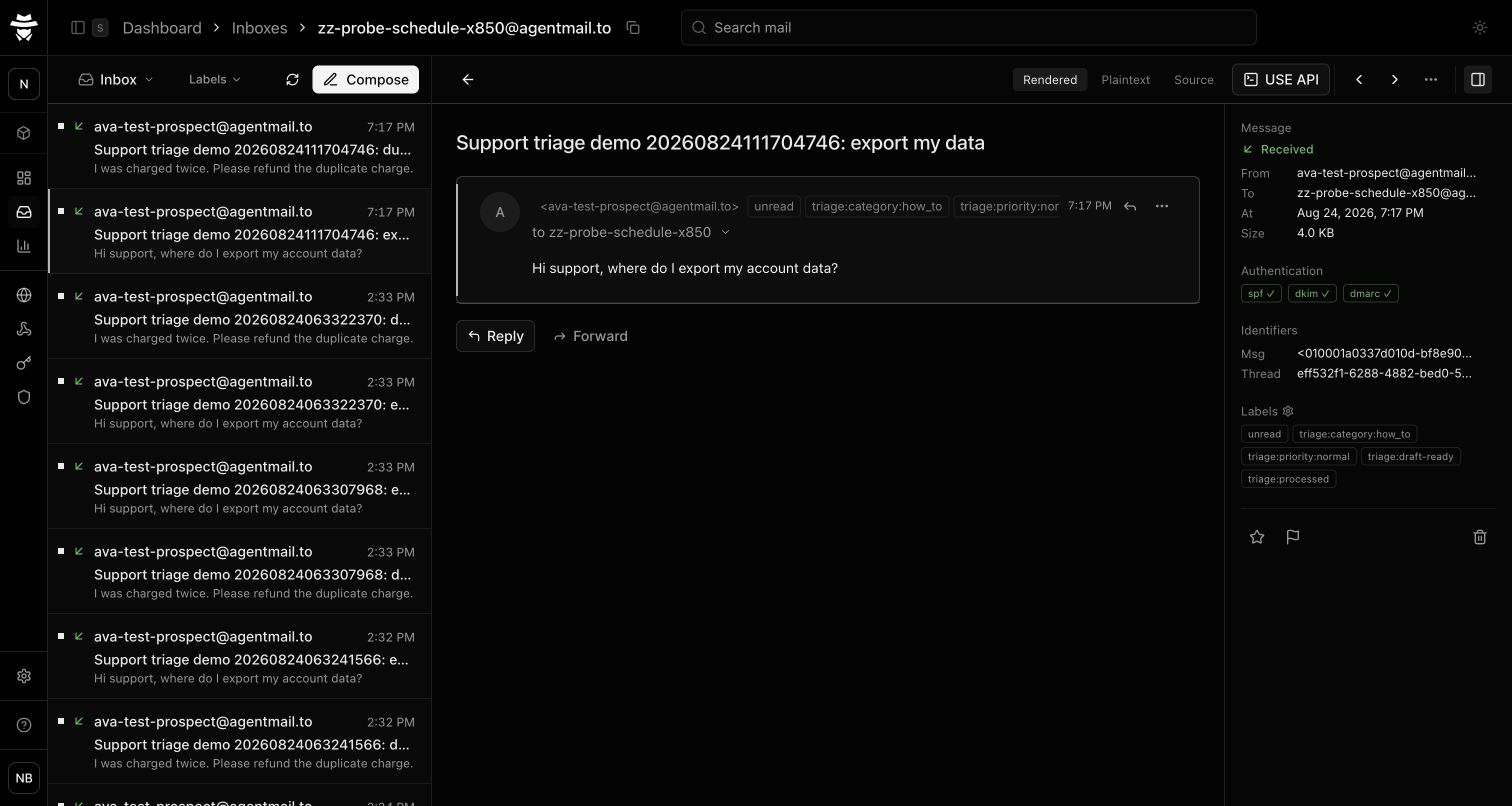
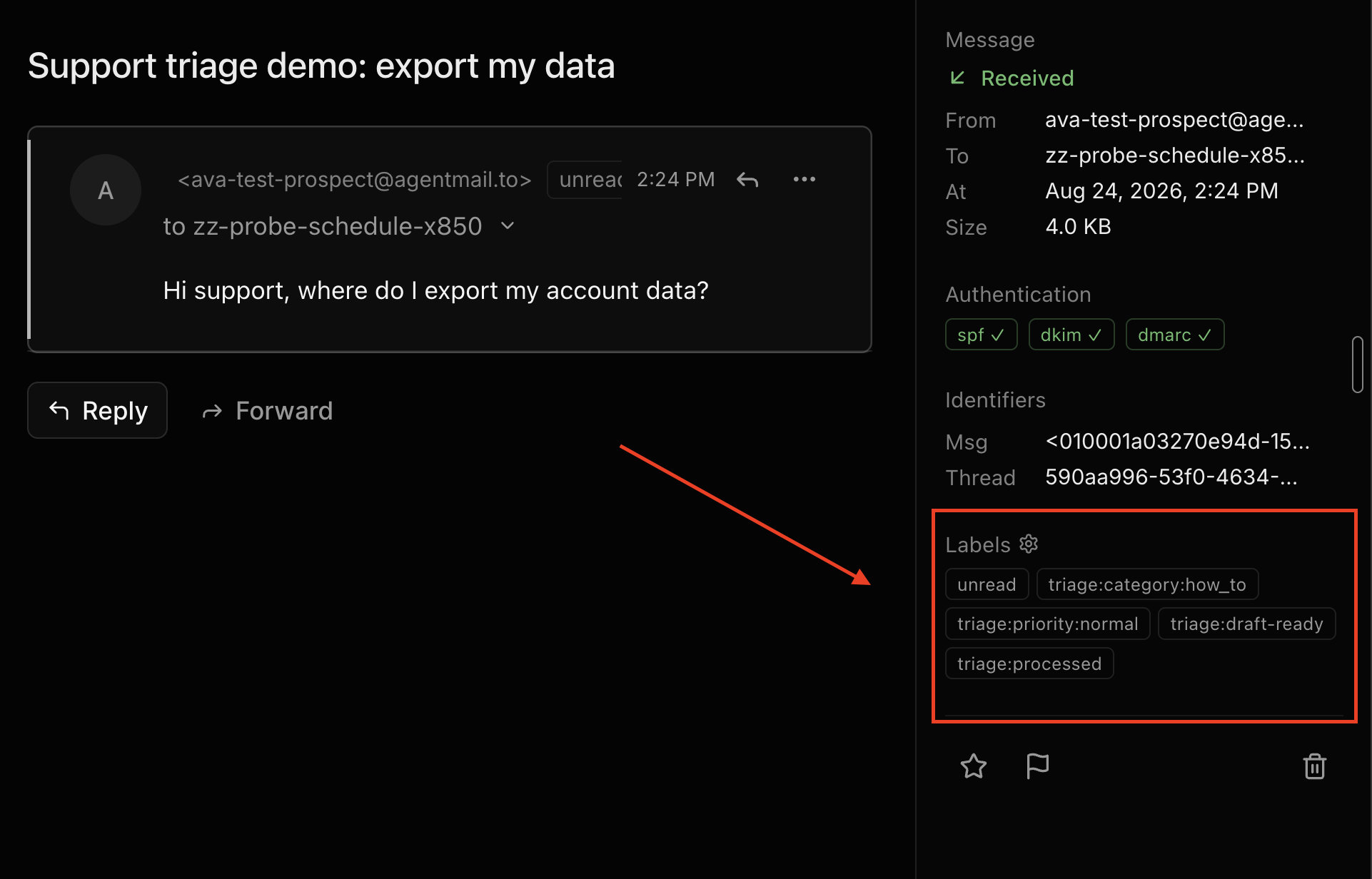
- Draft ready: A customer asks where to export their data. AgentMail adds
triage:category:how_to,triage:priority:normal, andtriage:draft-ready, then creates a draft in the same thread using an approved answer. - Human review: A customer disputes a charge. AgentMail adds
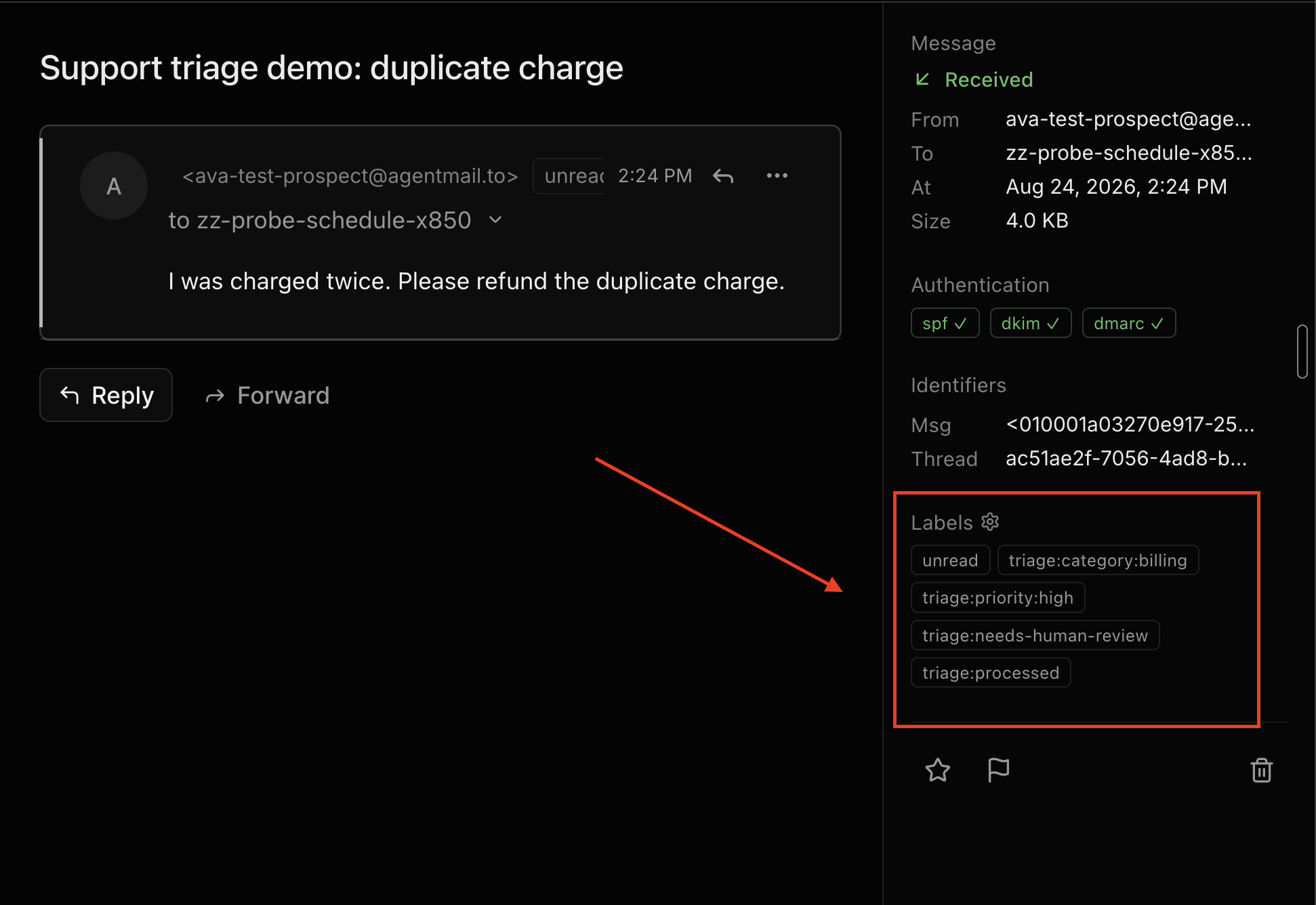
triage:category:billing,triage:priority:high, andtriage:needs-human-reviewwithout creating a draft.
The 24-second guided run uses cursor and click markers to show where the routine labels, reply draft, billing handoff, and successful webhook deliveries appear.
How it works
An incoming email goes through five steps before it becomes a draft or a message for human review.
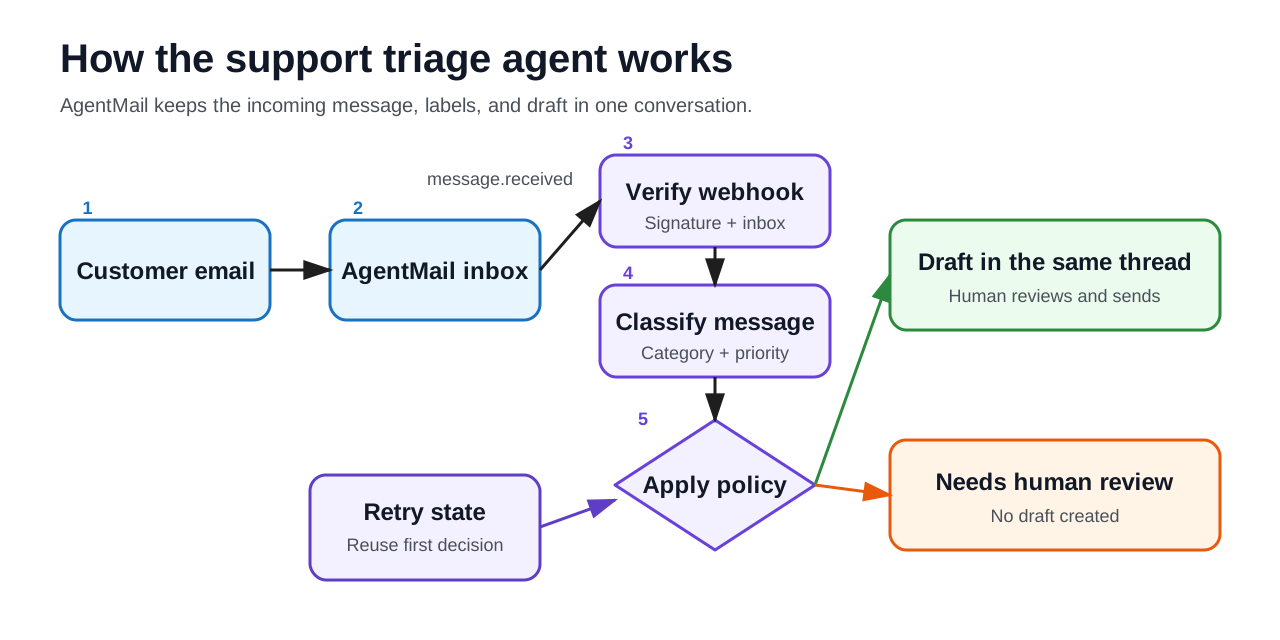
1. Verify the AgentMail event
AgentMail sends a signed message.received webhook when an email arrives. Before classifying the email, the app verifies the signature against the original request body, validates the payload, and checks that the event belongs to the configured support inbox.
2. Ask the model for a classification
OpenAI interprets the customer's message and returns a category, priority, summary, and optional key for a knowledge article the application already knows. The schema does not include reply text or an action such as send or create_draft, so the model can classify the message without deciding what the app should do next.
3. Decide whether to create a draft
The app creates a draft only when the classifier selects an approved knowledge article for the same category and gives the message low or normal priority. Every other message goes to human review, and changing the prompt cannot add a new answer or skip that rule because the decision lives in application code.
4. Save the result in AgentMail
For a routine question, AgentMail creates a draft in the same thread and adds triage:draft-ready, while a sensitive question gets triage:needs-human-review and no draft. Both outcomes stay with the original message, where a teammate can review the conversation and decide what to do next.
5. Handle retries
SQLite stores the first valid classification for each event, and overlapping deliveries reuse it. Once processing finishes, AgentMail adds triage:processed so later deliveries stop immediately. If a request fails after it creates a draft but before it adds that label, the draft's stable clientId makes the retry reuse the original draft.
Prerequisites
You need:
- Bun
- An AgentMail account and one support inbox
- An app API key restricted to the support inbox, with
Inbox Read,Message Read,Message Update,Draft Read, andDraft Create - A temporary setup key for the same inbox, with
Webhook Create - An OpenAI API key
- A public HTTPS tunnel to local port 3000
- The finished example repository
- For the automated demo only, a second inbox and a sender key with
Message Send
Use the setup key only while creating the webhook, then delete it before starting the server with the app API key and webhook signing secret. The optional demo uses its sender key in a separate process, and all credentials belong in ignored environment files rather than source, logs, or screenshots.
Clone the example, run bun install, and prepare three ignored environment files:
cp .env.example .env.runtime
cp .env.setup.example .env.setup
cp .env.demo.example .env.demo
The app needs .env.runtime and .env.setup, and the automated demo also needs .env.demo to send the two test messages.
1. Receive AgentMail's webhook
AgentMail sends many webhook fields in snake case, but this workflow only uses a few of them. The schema below requires those fields and allows the rest with z.looseObject().
Create src/wire.ts:
import { z } from "zod"

export const MessageReceivedEventSchema = z.looseObject({
    type: z.literal("event"),
    event_type: z.literal("message.received"),
    event_id: z.string().min(1),
    message: z.looseObject({
        inbox_id: z.string().min(1),
        thread_id: z.string().min(1),
        message_id: z.string().min(1),
        labels: z.array(z.string()),
        timestamp: z.string().min(1),
        from: z.string().min(1),
        to: z.array(z.string()),
        subject: z.string().optional(),
        text: z.string().optional(),
        extracted_text: z.string().optional(),
    }),
})

export type MessageReceivedEvent = z.infer<typeof MessageReceivedEventSchema>
AgentMail signs the original request body, so the route must verify those bytes before any JSON middleware parses them. The route uses express.raw to preserve the body, Svix to verify the signature, and a 1 MB limit that matches AgentMail's maximum webhook payload size.
Add the route to src/server.ts:
app.post(
        "/webhooks",
        express.raw({ type: "application/json", limit: "1mb" }),
        async (req, res) => {
            const payload = z.instanceof(Buffer).parse(req.body)
            const headers = HeaderRecordSchema.parse(
                Object.fromEntries(
                    Object.entries(req.headers).flatMap(([name, value]) =>
                        typeof value === "string" ? [ [name, value] ] : [],
                    ),
                ),
            )

            let verified: unknown
            try {
                verified = verifier.verify(payload, headers)
            } catch {
                res.status(400).json({ error: "invalid webhook signature" })
                return
            }

            const parsed = MessageReceivedEventSchema.safeParse(verified)
            if (!parsed.success) {
                res.status(400).json({
                    error: "malformed message.received payload",
                })
                return
            }
            if (parsed.data.message.inbox_id !== input.inboxId) {
                res.status(403).json({
                    error: "event delivered for another inbox",
                })
                return
            }

            try {
                await processSupportEvent({
                    event: parsed.data,
                    agentMail: input.agentMail,
                    store: input.store,
                    classify: input.classify,
                })
                res.status(204).send()
            } catch (error) {
                console.error("support triage failed", error)
                try {
                    await input.agentMail.inboxes.messages.update(
                        parsed.data.message.inbox_id,
                        parsed.data.message.message_id,
                        {
                            addLabels: [
                                "triage:error",
                                "triage:needs-human-review",
                                "triage:processed",
                            ],
                        },
                    )
                    res.status(204).send()
                } catch (labelError) {
                    console.error("support triage handoff failed", labelError)
                    res.status(500).json({ error: "triage handoff failed" })
                }
            }
        },
    )
The inbox_id check prevents this app from acting on another inbox. If classification or draft creation fails, the handler adds triage:error and triage:needs-human-review, and it returns 500 only if AgentMail cannot add those labels.
For more detail on the signature headers and signing secret, see AgentMail's webhook verification guide.
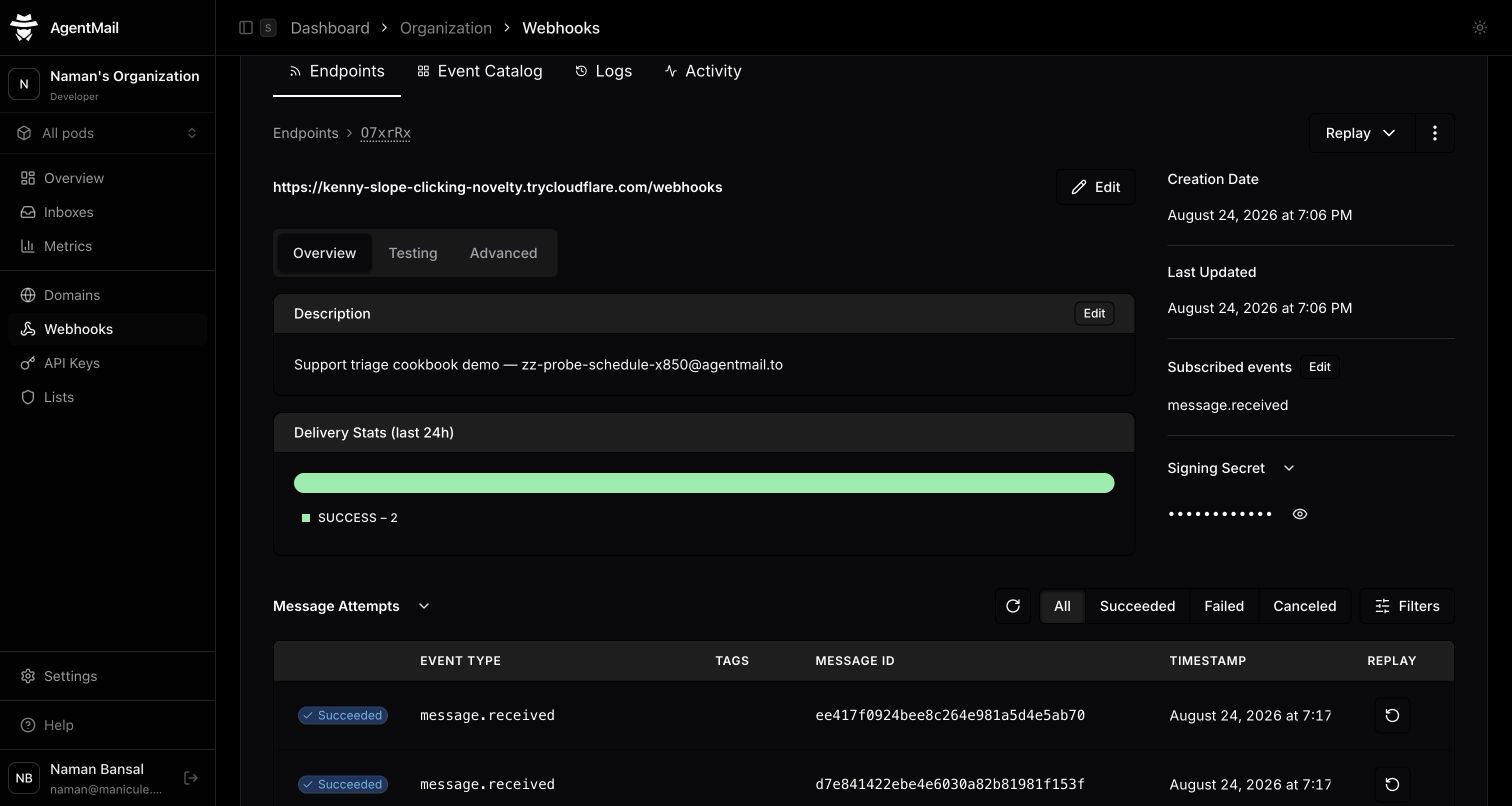
AgentMail recorded two successful webhook deliveries when the test messages arrived.
2. Classify the support email
The policy needs a predictable category, priority, summary, and knowledge article even though customers write in natural language, so define that output before calling the model.
Create src/triage.ts:
import { openai } from "@ai-sdk/openai"
import { generateText, Output } from "ai"
import { z } from "zod"

export const SupportCategorySchema = z.enum([
    "how_to",
    "bug",
    "billing",
    "account_access",
    "feedback",
    "other",
])

export const SupportPrioritySchema = z.enum(["low", "normal", "high", "urgent"])

export const KnowledgeArticleSchema = z.enum(["export-data", "change-timezone"])

export const TriageDecisionSchema = z.object({
    category: SupportCategorySchema,
    priority: SupportPrioritySchema,
    summary: z.string().min(1).max(240),
    knowledgeArticle: KnowledgeArticleSchema.nullable(),
})

export type TriageDecision = z.infer<typeof TriageDecisionSchema>

export async function classifySupportEmail(input: {
    readonly from: string
    readonly subject: string
    readonly body: string
}): Promise<TriageDecision> {
    const { output } = await generateText({
        model: openai("gpt-5.6"),
        output: Output.object({ schema: TriageDecisionSchema }),
        system: [
            "Classify one inbound support email.",
            "Choose a knowledgeArticle only when the email is directly answered by that article.",
            "export-data covers requesting a downloadable account export.",
            "change-timezone covers changing the timezone used in the product UI.",
            "Billing, refunds, account access, data deletion, and security reports require human review.",
            "Set billing and refund requests to high priority.",
            "Set account access, data deletion, and security reports to urgent priority.",
            "Do not write a customer reply and do not decide whether a reply may be sent.",
        ].join(" "),
        prompt: `From: ${input.from}\nSubject: ${input.subject}\n\n${input.body}`,
    })

    return output
}
Output.object validates the model response against the Zod schema before returning it. If the response contains a category, priority, or knowledge article key outside the schema, validation fails before the policy sees it.
Change these example categories and priorities to match your support policy, and send sensitive topics to a person even when the message sounds routine.
3. Choose draft or review
I could ask the model to write routine replies, or I could let it select from answers the support team had already approved. I chose the approved answers, which keeps the reply text under application control. The app checks three conditions before creating a draft:
- The classifier selected a known article.
- The article belongs to the classified category.
- The priority is low or normal.
Create src/policy.ts:
import { z } from "zod"
import type { KnowledgeArticleSchema, TriageDecision } from "./triage"

type KnowledgeArticle = z.infer<typeof KnowledgeArticleSchema>

const KNOWLEDGE_ARTICLES = {
    "export-data": {
        category: "how_to",
        reply: "You can request an account export from Settings > Data export > Request export. We will email the download link when the file is ready.",
    },
    "change-timezone": {
        category: "how_to",
        reply: "Open Settings > Preferences, choose your timezone, and save the change. New dates in the product will use that timezone.",
    },
} satisfies Record<KnowledgeArticle, { category: "how_to"; reply: string }>

export const SupportActionSchema = z.discriminatedUnion("kind", [
    z.object({
        kind: z.literal("draft_reply"),
        text: z.string(),
        labels: z.array(z.string()),
    }),
    z.object({
        kind: z.literal("human_review"),
        labels: z.array(z.string()),
    }),
])

export type SupportAction = z.infer<typeof SupportActionSchema>

export function decideSupportAction(triage: TriageDecision): SupportAction {
    const article =
        triage.knowledgeArticle === null
            ? null
            : KNOWLEDGE_ARTICLES[triage.knowledgeArticle]
    const draftAllowed =
        article !== null &&
        article.category === triage.category &&
        (triage.priority === "low" || triage.priority === "normal")

    if (draftAllowed) {
        return {
            kind: "draft_reply",
            text: `${article.reply}\n\nA support teammate will review this draft before it is sent.`,
            labels: [
                `triage:category:${triage.category}`,
                `triage:priority:${triage.priority}`,
                "triage:draft-ready",
            ],
        } satisfies SupportAction
    }

    return {
        kind: "human_review",
        labels: [
            `triage:category:${triage.category}`,
            `triage:priority:${triage.priority}`,
            "triage:needs-human-review",
        ],
    } satisfies SupportAction
}
A normal export question returns draft_reply with the approved instructions. decideSupportAction returns human_review without reply text for unknown questions, sensitive categories, high-priority messages, or knowledge articles that do not match the category.
4. Make retries idempotent
A webhook request can fail after the model returns a classification but before the app finishes updating AgentMail. The app uses three controls so a retry continues from the same decision:
- SQLite stores the first valid classification for each AgentMail event ID. Every retry reads that row before choosing an action, including two deliveries that overlap.
- AgentMail uses a stable
clientIdto return the same draft if the app repeats the create request. - The
triage:processedlabel stops a completed event before classification or draft creation.
Create src/store.ts:
import { Database } from "bun:sqlite"
import { z } from "zod"
import { type TriageDecision, TriageDecisionSchema } from "./triage"

const StoredDecisionRowSchema = z.object({
    decision_json: z.string(),
})

export class TriageStore {
    readonly #db: Database

    constructor(path: string) {
        this.#db = new Database(path, { create: true, strict: true })
        this.#db.run("PRAGMA journal_mode = WAL")
        this.#db.run(`
      CREATE TABLE IF NOT EXISTS triage_decision (
        event_id TEXT PRIMARY KEY,
        decision_json TEXT NOT NULL,
        created_at TEXT NOT NULL DEFAULT CURRENT_TIMESTAMP
      )
    `)
    }

    get(eventId: string): TriageDecision | null {
        const row = StoredDecisionRowSchema.nullable().parse(
            this.#db
                .query(
                    "SELECT decision_json FROM triage_decision WHERE event_id = ?",
                )
                .get(eventId),
        )
        if (row === null) return null
        return TriageDecisionSchema.parse(JSON.parse(row.decision_json))
    }

    put(eventId: string, decision: TriageDecision): TriageDecision {
        this.#db
            .query(
                "INSERT INTO triage_decision (event_id, decision_json) VALUES (?, ?) ON CONFLICT (event_id) DO NOTHING",
            )
            .run(eventId, JSON.stringify(decision))
        const stored = StoredDecisionRowSchema.parse(
            this.#db
                .query(
                    "SELECT decision_json FROM triage_decision WHERE event_id = ?",
                )
                .get(eventId),
        )
        return TriageDecisionSchema.parse(JSON.parse(stored.decision_json))
    }
}
Then connect the stored decision to the AgentMail message, draft, and labels in src/process-event.ts:
import type { AgentMailClient } from "agentmail"
import { decideSupportAction } from "./policy"
import type { TriageStore } from "./store"
import { classifySupportEmail, type TriageDecision } from "./triage"
import type { MessageReceivedEvent } from "./wire"

export async function processSupportEvent(input: {
    readonly event: MessageReceivedEvent
    readonly agentMail: AgentMailClient
    readonly store: TriageStore
    readonly classify?: (email: {
        readonly from: string
        readonly subject: string
        readonly body: string
    }) => Promise<TriageDecision>
}) {
    const message = await input.agentMail.inboxes.messages.get(
        input.event.message.inbox_id,
        input.event.message.message_id,
    )
    if (message.labels.includes("triage:processed")) {
        return { kind: "already_processed" } satisfies {
            kind: "already_processed"
        }
    }

    let triage = input.store.get(input.event.event_id)
    if (triage === null) {
        const classify = input.classify ?? classifySupportEmail
        triage = await classify({
            from: input.event.message.from,
            subject: input.event.message.subject ?? "(no subject)",
            body:
                input.event.message.extracted_text ??
                input.event.message.text ??
                "(no plain-text body)",
        })
        triage = input.store.put(input.event.event_id, triage)
    }

    const action = decideSupportAction(triage)
    if (action.kind === "draft_reply") {
        await input.agentMail.inboxes.drafts.create(
            input.event.message.inbox_id,
            {
                inReplyTo: input.event.message.message_id,
                text: action.text,
                labels: action.labels,
                clientId: `support-triage-${input.event.event_id}`,
            },
        )
    }

    await input.agentMail.inboxes.messages.update(
        input.event.message.inbox_id,
        input.event.message.message_id,
        { addLabels: [...action.labels, "triage:processed"] },
    )

    return action
}
The inReplyTo field creates the draft in the same thread as the incoming message. The labels stay on that message, so the support team can scan and filter the inbox without opening every conversation. See the AgentMail guides for drafts and idempotent requests.
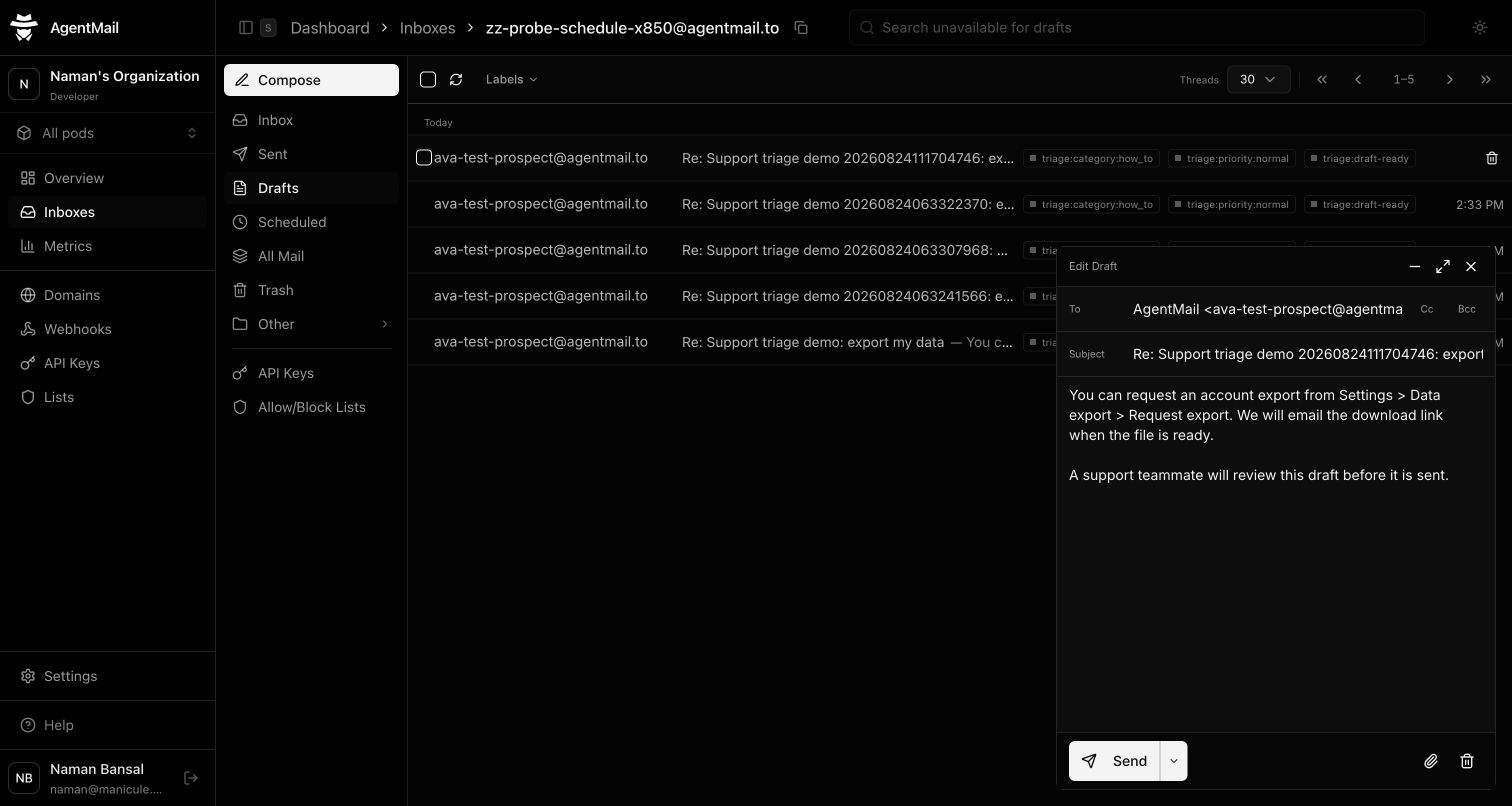
Creating the draft and labeling the incoming message require separate API calls. If the first call succeeds and the second fails, the stable draft clientId makes the retry reuse the draft that already exists.
5. Connect the webhook to the support inbox
After you create the support inbox in AgentMail, copy its address into AGENTMAIL_INBOX_ID in all three environment files and create two keys:
- Put the app API key with the five permissions listed above in
.env.runtimeasAGENTMAIL_API_KEY. LeaveMessage SendandDraft Senddisabled for this version. - Put a temporary key for the same inbox in
.env.setupasAGENTMAIL_SETUP_API_KEY. It needsWebhook Createbut does not need permission to send mail.
Start your HTTPS tunnel to local port 3000 and add its public /webhooks URL to .env.setup. The setup script creates the webhook on the support inbox, so AgentMail only sends events from that address.
Create src/setup-agentmail.ts:
import "dotenv/config"
import { AgentMailClient } from "agentmail"
import { z } from "zod"

const env = z
    .object({
        AGENTMAIL_SETUP_API_KEY: z.string().min(1),
        AGENTMAIL_INBOX_ID: z.string().min(1),
        WEBHOOK_URL: z.string().url(),
    })
    .parse(process.env)
const agentMail = new AgentMailClient({ apiKey: env.AGENTMAIL_SETUP_API_KEY })

const webhook = await agentMail.inboxes.webhooks.create(
    env.AGENTMAIL_INBOX_ID,
    {
        url: env.WEBHOOK_URL,
        eventTypes: ["message.received"],
        clientId: "support-triage-demo-webhook",
    },
)

await Bun.write(
    ".env.agentmail.local",
    [
        `AGENTMAIL_INBOX_ID=${env.AGENTMAIL_INBOX_ID}`,
        `AGENTMAIL_WEBHOOK_SECRET=${webhook.secret}`,
        "",
    ].join("\n"),
)
console.log("Wrote the inbox ID and webhook secret to .env.agentmail.local")
Run the setup once:
bun --env-file=.env.setup run setup:agentmailCopy the signing secret from .env.agentmail.local into .env.runtime, then delete the temporary setup key. Start the receiver with only the runtime environment:
bun --env-file=.env.runtime run devThe setup script uses a stable webhook clientId, so running it again reuses the same webhook. It saves the signing secret to an ignored file instead of printing it. To inspect delivery, open Dashboard → Webhooks → Endpoints, choose this endpoint, and scroll to Message Attempts.
Run it
You can test the app by sending two emails from your own mailbox to the AgentMail support address, so the repository does not need a sender credential.
First, send:
Subject: Export my data
Where do I export my data?
AgentMail should add these labels:
triage:category:how_totriage:priority:normaltriage:draft-readytriage:processed
Open the thread and confirm there is one reply draft containing the approved export instructions.
Then send:
Subject: Duplicate charge
I was charged twice. Refund the duplicate charge.
AgentMail should add these labels:
triage:category:billingtriage:priority:hightriage:needs-human-reviewtriage:processed
The billing thread should have no draft. After checking it, replay the processed export event and confirm that AgentMail does not create a second draft. You can also send an unsigned request to /webhooks; the app should return 400.
For an automated check, create a second AgentMail inbox and a key scoped to that sender with Message Send. Put them in .env.demo as AGENTMAIL_DEMO_SENDER_INBOX_ID and AGENTMAIL_DEMO_SENDER_API_KEY, then run:
bun --env-file=.env.demo run demoThe demo process uses one key to send the two test emails and the app API key to inspect the support inbox, without exposing the sender key to the webhook server.
Next steps
Replace the two sample knowledge articles with answers your support team has approved, then adjust the categories and priorities to match your escalation policy. Send one routine question and one sensitive request before connecting the inbox to real users.
Because AgentMail keeps the incoming email, labels, and reply draft in one conversation, a teammate can review the agent's work without leaving the inbox. Create an AgentMail inbox and use the finished example repository as the starting point.