Most of the web is locked behind an email address.
Sign up for a service and you need an email. Confirm your account and you have to check your inbox. Whether you’re resetting a password, completing 2FA, or getting a receipt, it all comes back to email. Most services need an email address to create an account, whether it’s for verification links, OTP codes, or magic links. If a browser agent doesn’t have its own inbox, it usually can’t get past these steps.
Browser Use is a top tool for letting AI agents control a browser, with 85,700 GitHub stars since November 2024. Still, even the best browser agent gets stuck when a site asks you to check your email to continue.
That changes today.
AgentMail gives AI agents their own email inboxes. With Browser Use, agents can also control a browser. When you combine these features, your agent can manage the entire web, even tasks that once needed a person to check their inbox.
Email is now built into every Browser Use session.
We’re partnering with Browser Use to bring email inboxes to every agent session. There’s no API key, no configuration, and nothing you need to set up.
If you use Browser Use Cloud, AgentMail is already there. Each session gets its own inbox automatically. All you have to do is give the agent a task.
Ask it to sign up for Instagram. It will create a new inbox right away, fill in the email address, submit the form, wait for the verification email, confirm the account, and move on.
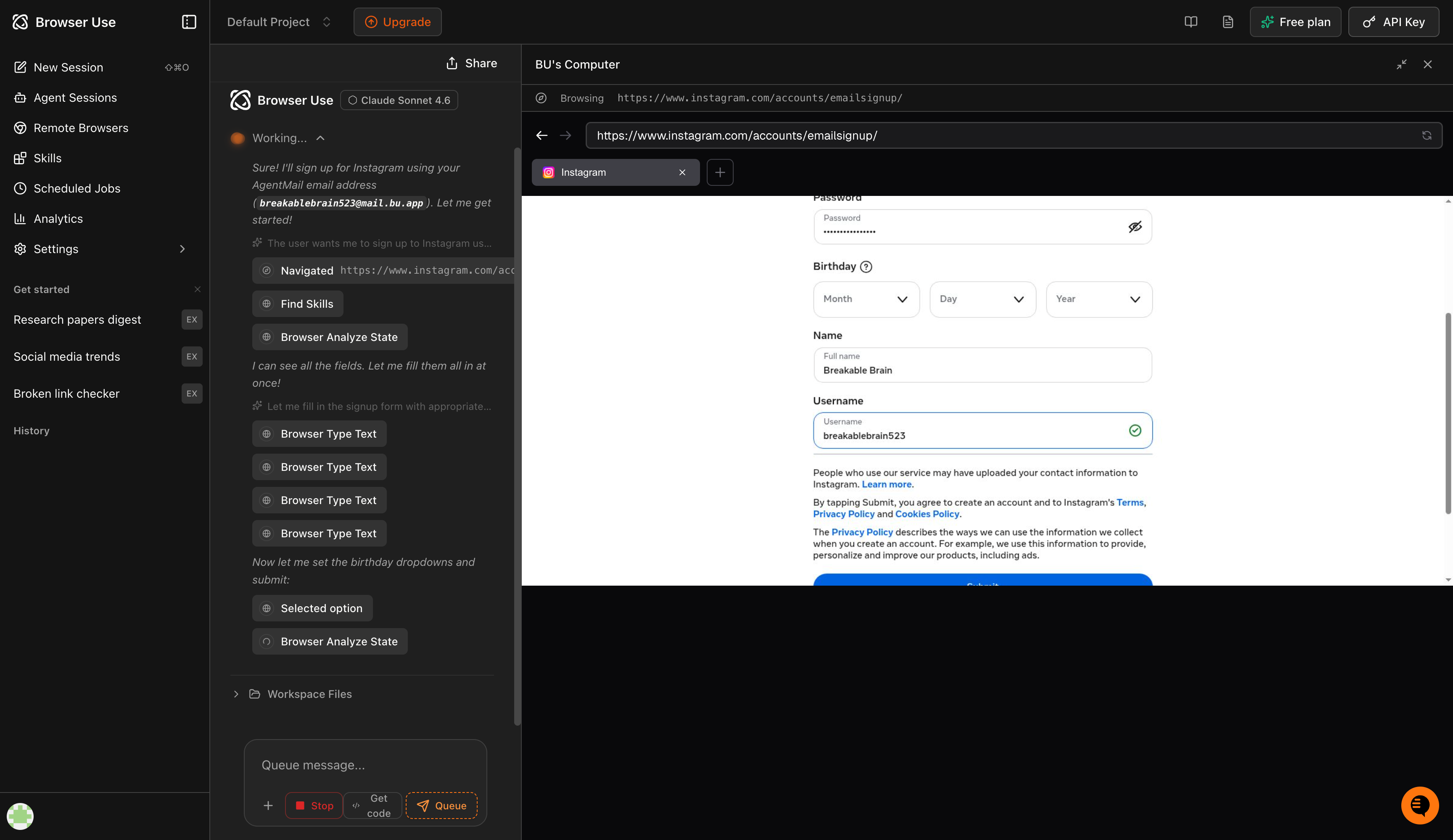
The example above shows a real Browser Use Cloud session. The agent creates an inbox using AgentMail, picks up the address automatically, and fills in the form fields name, username, birthday, password - and is mid-signup without any human involvement. No copy-pasting credentials. No tab-switching to check an inbox. The agent handles the whole thing.
Each session has its own separate inbox. When the session ends, the inbox disappears. Every run starts fresh.
What you can do now
Before now, browser agents would get stuck whenever an email was needed. That’s no longer the case. Here are a few things you can do now:
Account creation: Sign up for any service that needs email verification. The agent manages the inbox, the verification link, and everything that comes after.
2FA and OTP flows: Authentication codes sent during a session go straight to the agent’s inbox and are picked up automatically. No pauses, no interruptions.
Confirmation and receipt emails: The agent can use the emails it receives, not just send them. Booking confirmations, order receipts, and access links can all be processed in real time.
Research and competitive monitoring: The agent can handle trial signups, newsletter subscriptions, and product registrations. It signs up, gets access, and reports back.
This is what happens when a browser agent can handle the entire process, not just the steps that don’t require a login.
For developers: use it in your own code
If you’re building with Browser Use open source and want this feature in your own setup, you can connect it directly with AgentMail. For this option, you’ll need an AgentMail API key. Sign up here.
You can find the integration in Browser Use’s official examples under examples/integrations/agentmail/. It adds two tools to the agent: one for getting the inbox address and one for fetching the latest email.
import asyncio
import os

os.environ["BROWSER_USE_API_KEY"] = "your-browser-use-key"
os.environ["AGENTMAIL_API_KEY"] = "your-agentmail-key"

from browser_use import Agent, ChatBrowserUse, Browser
from agentmail import AsyncAgentMail
from email_tools import EmailTools  # Provided in the Browser Use example (see examples/integrations/agentmail/)

async def main():
    client = AsyncAgentMail(api_key=os.environ["AGENTMAIL_API_KEY"])
    inbox = await client.inboxes.create()
    print(f"Created inbox: {inbox.inbox_id}")

    email_tools = EmailTools(client, inbox=inbox)
    browser = Browser(use_cloud=True)

    agent = Agent(
        task=f"Sign up for Reddit using {inbox.inbox_id} and verify the account.",
        llm=ChatBrowserUse(model="bu-2-0"),
        browser=browser,
        tools=email_tools,
    )
    result = await agent.run()
    print(f"Result: {result}")

if __name__ == "__main__":
    asyncio.run(main())
Get started
If you use Browser Use Cloud, there’s nothing to set up. Just open cloud.browser-use.com and start building.
If you’re working on something interesting with this, we’d love to hear from you.
AgentMail gives your agents real inboxes. Create inboxes via API. Send and receive Emails with 0 complexity. Free to start.