> For clean Markdown content of this page, append .md to this URL. For the complete documentation index, see https://www.agentmail.to/docs/llms.txt.
# Inboxes
> Learn how AgentMail Inboxes act as scalable, API-first email accounts for your agents.
## What is an Inbox?
People are used to the traditional Gmail limitations -- only having one inbox. That's of the past.
An `Inbox` is now a fully loaded, programmatically accessible API resource re-designed for the scale of AI Agents.
Think of it as being similar to a Gmail or Outlook account, but built API-first. Each `Inbox` has a unique email address and serves as the primary resource your agent uses to send and receive emails, giving it a first-class identity on the internet.
Unlike traditional email providers that are designed for human scale, AgentMail `Inboxes` are built to scale horizontally. You can create tens, hundreds, or even thousands of `Inboxes` for your agents on demand.
> **Tip**
>
> Psst! Rather than sending 1000 emails from 1 `Inbox`, sending 10 emails
> across 100 `Inboxes` actually improves deliverability! Read more about
> optimizing for deliverability [here](/docs/best-practices/email-deliverability)
### The AgentMail Hierarchy
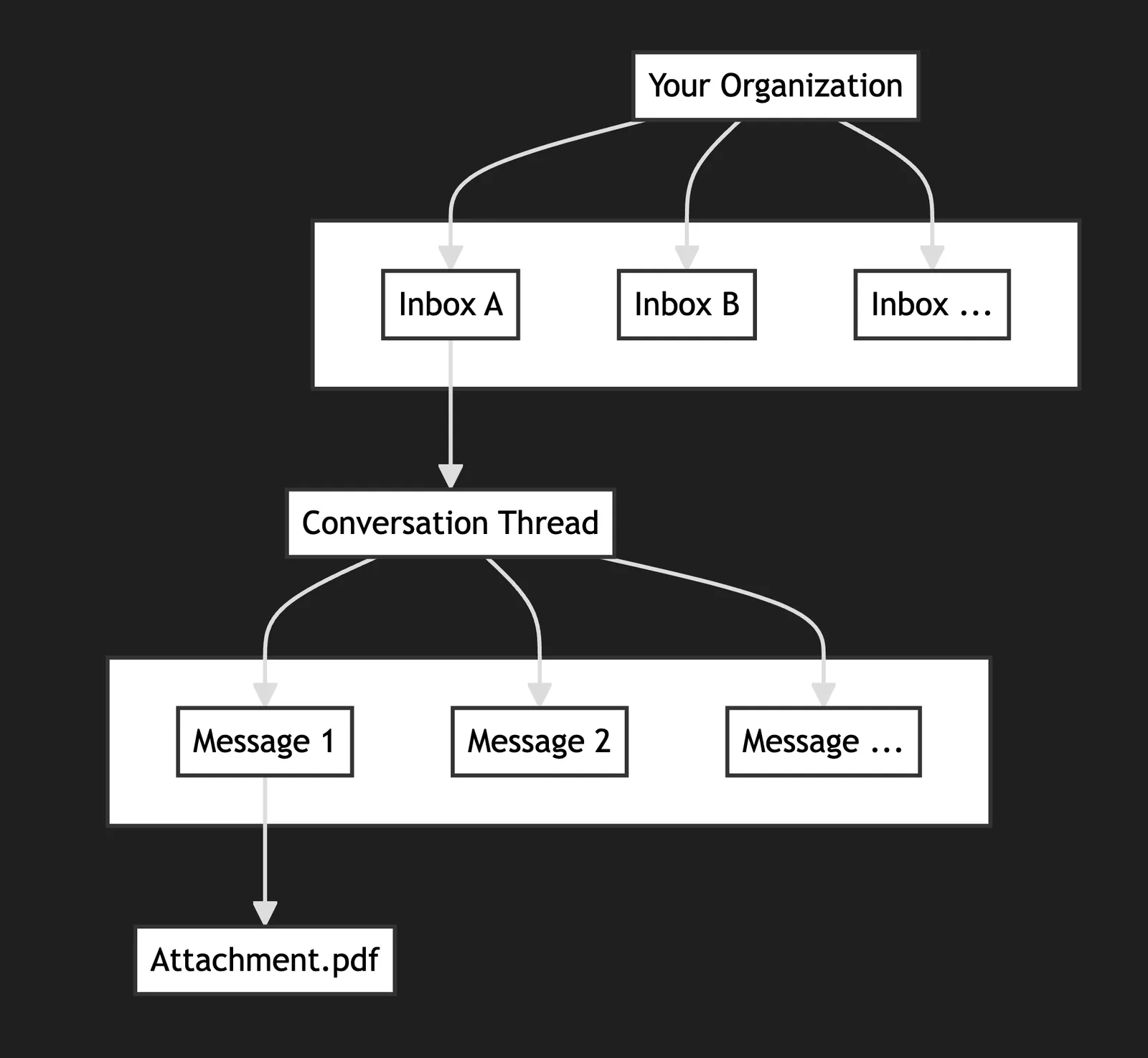
As the diagram below illustrates, your `organization` is the top-level container that holds all your resources. You can provision many `Inboxes` within your `organization`, each with its own `Threads`, `Messages`, and `Attachments`, allowing you to manage a large fleet of agents seamlessly.
#### Organization
Your `organization` is the highest-level entity. It acts as a container for
all your `Inboxes`, `Domains`, and API keys, allowing you to manage
everything in one place.
#### Inbox
An `Inbox` is a single, scalable "email account" for your agent. You can
create thousands of `Inboxes` within your organization, each with its own
unique email address.
#### Thread
A `Thread` represents a single conversation. It groups together all replies
and forwards related to an initial email, keeping your interactions
organized.
#### Message
A `Message` is an individual email. It contains the content, sender,
recipients, and any associated metadata or `Attachments`. You can cc humans
at any point in time to keep a "human-in-the-loop"
#### Attachment
An `Attachment` is a file that is sent along with a `Message`. You can
programmatically access and download attachments from incoming `Messages`.
## Core Capabilities
Here at AgentMail we've now made an `Inbox` an API resource, meaning you can perform standard CRUD operations on it. Here are the core capabilities you'll use to manage your `Inboxes`.
```python
from agentmail import AgentMail
# Initialize the client
client = AgentMail(api_key="YOUR_API_KEY")
# --- Create an Inbox ---
# Creates a new inbox with a default agentmail.to domain
new_inbox = client.inboxes.create()
print(f"Created Inbox: {new_inbox.inbox_id}")
# --- Retrieve an Inbox ---
# Gets a specific inbox by its ID
retrieved_inbox = client.inboxes.get(inbox_id = 'my_name@domain.com')
print(f"Retrieved Inbox: {retrieved_inbox.inbox_id}")
# --- List Inboxes ---
# Lists all inboxes in your organization
all_inboxes = client.inboxes.list()
print(f"Total Inboxes: {all_inboxes.count}")
```
**`TypeScript`**
```typescript title="TypeScript"
import { AgentMailClient } from "agentmail";
// Initialize the client
const client = new AgentMailClient({ apiKey: "YOUR_API_KEY" });
// --- Create an Inbox ---
// Creates a new inbox with a default agentmail.to domain
const newInbox = await client.inboxes.create({
username: "docs-testing",
domain: "domain.com",
displayName: "Docs Tester",
});
console.log(`Created Inbox: ${newInbox.id}`);
// --- Retrieve an Inbox ---
// Gets a specific inbox by its ID
const inboxId = newInbox.id;
const retrievedInbox = await client.inboxes.get(inboxId);
console.log(`Retrieved Inbox: ${retrievedInbox.inbox_id}`);
// --- List Inboxes ---
// Lists all inboxes in your organization
const allInboxes = await client.inboxes.list();
console.log(`Total Inboxes: ${allInboxes.count}`);
```
**`CLI`**
```bash title="CLI"
# create an inbox
agentmail inboxes create \
--username docs-testing \
--domain domain.com \
--display-name "Docs Tester"
# get an inbox
agentmail inboxes get --inbox-id my_name@domain.com
# list all inboxes
agentmail inboxes list
```
> **Tip**
>
> When creating an `Inbox`, the `username` and `domain` are optional. If you
> don't provide them, AgentMail will generate a unique address for you using our
> default domain. You can also set `domain` to one of your verified custom
> domains, or to any subdomain of a domain with [subdomains enabled](/docs/custom-domains#setting-up-subdomains). Check out our [guide on managing domains](/docs/managing-domains).
## Signatures
Give an inbox a signature and AgentMail adds it to every message the inbox sends, so your agent never has to remember it. It applies to sends, replies, reply-alls, forwards, and drafts, including scheduled ones, whether they come from the API, the MCP server, or SMTP.
* **Placement:** right after your content, above any quoted or forwarded message.
* **No duplicates:** if your message body already contains the signature, it is not added again.
* **Text and HTML:** `text` goes in the plain-text part. `html` is optional; without it, the HTML part gets `text` with its line breaks. Link a logo by URL rather than embedding it: `text` is limited to 1,000 characters and `html` to 4,000.
* **Visa TAP messages** are sent exactly as written, without the signature.
Set it when you create the inbox or later with an update. Send `signature: null` to remove it.
**`TypeScript`**
```typescript title="TypeScript"
// set the inbox signature
await client.inboxes.update("support-agent@agentmail.to", {
signature: {
text: "Ava, Acme Support\nacme.com",
html: 'Ava, Acme Support
acme.com',
},
});
// remove it
await client.inboxes.update("support-agent@agentmail.to", { signature: null });
```
**`cURL`**
```bash title="cURL"
# set the inbox signature
curl -X PATCH "https://api.agentmail.to/v0/inboxes/support-agent@agentmail.to" \
-H "Authorization: Bearer $AGENTMAIL_API_KEY" \
-H "Content-Type: application/json" \
-d '{"signature": {"text": "Ava, Acme Support\nacme.com", "html": "Ava, Acme Support
acme.com"}}'
# remove it
curl -X PATCH "https://api.agentmail.to/v0/inboxes/support-agent@agentmail.to" \
-H "Authorization: Bearer $AGENTMAIL_API_KEY" \
-H "Content-Type: application/json" \
-d '{"signature": null}'
```
## Profile pictures
The recipient's email provider controls the picture displayed beside your emails. AgentMail does not currently expose a profile-picture field; `display_name` changes the sender name only. See [Inbox profile pictures](/docs/knowledge-base/inbox-profile-pictures) for Google account photos, BIMI logos, and their requirements.
## Metadata
Attach your own key-value data to any `Inbox` with the `metadata` field. Use it to link an inbox to records in your own system: a user ID, an agent name, or feature flags. Metadata is returned on every inbox response.
Values may be a string, number, or boolean. An `Inbox` can hold up to 256 keys, and each key and string value is limited to 256 characters.
**`Python`**
```python title="Python"
from agentmail.inboxes import CreateInboxRequest
# Attach metadata when creating an inbox; values may be a string, int, float, or boolean
inbox = client.inboxes.create(
request=CreateInboxRequest(
username="support-agent",
metadata={
"tenant_id": "acme", # string
"seat_count": 5, # int
"monthly_spend": 19.99, # float
"active": True, # boolean
},
),
)
# Read it back from any inbox response
print(inbox.metadata)
```
**`TypeScript`**
```typescript title="TypeScript"
// Attach metadata when creating an inbox; values may be a string, int, float, or boolean
const inbox = await client.inboxes.create({
username: "support-agent",
metadata: {
tenant_id: "acme", // string
seat_count: 5, // int
monthly_spend: 19.99, // float
active: true, // boolean
},
});
// Read it back from any inbox response
console.log(inbox.metadata);
```
### Updating metadata
Updates **merge** into the inbox's existing metadata — keys you include are added or overwritten, and keys you omit are preserved.
> **Note**
>
> To remove a single key, send it with a `null` value. To clear all metadata at
> once, send `metadata` as `null`. Every update must include at least one of
> `display_name`, `status`, or `metadata`.
**`Python`**
```python title="Python"
# Add or overwrite keys; the keys you omit stay unchanged
client.inboxes.update(
inbox_id="support-agent@agentmail.to",
metadata={"tier": "enterprise"},
)
# Remove a single key
client.inboxes.update(
inbox_id="support-agent@agentmail.to",
metadata={"tier": None},
)
# Clear all metadata
client.inboxes.update(
inbox_id="support-agent@agentmail.to",
metadata=None,
)
```
**`TypeScript`**
```typescript title="TypeScript"
// Add or overwrite keys; the keys you omit stay unchanged
await client.inboxes.update("support-agent@agentmail.to", {
metadata: { tier: "enterprise" },
});
// Remove a single key
await client.inboxes.update("support-agent@agentmail.to", {
metadata: { tier: null },
});
// Clear all metadata
await client.inboxes.update("support-agent@agentmail.to", {
metadata: null,
});
```
## Deactivating an inbox
Deactivate an inbox to stop it sending and receiving mail without deleting it. The address stays yours, and you can reactivate the inbox at any time. Deactivating and reactivating need the `inbox_update` permission.
> **Warning**
>
> Mail sent to a deactivated inbox is not delivered. It is not bounced, the
> sender is not told, and it is not delivered when you reactivate the inbox.
While an inbox is deactivated:
* **Sending is blocked.** Send, reply, forward, and sending a draft return `403` with code [`inbox_deactivated`](/docs/errors#inbox_deactivated). A retry of a send that already completed before the deactivation, with the same `Idempotency-Key`, still returns the original result; it sends nothing.
* **Scheduled drafts fail.** A draft scheduled to send while the inbox is deactivated is not sent and its `send_status` becomes `failed`. Reactivating the inbox does not retry it.
* **Incoming mail is not delivered**, and no `message.received` event is sent for it. A message also addressed to other inboxes is still delivered to them.
* **AgentID sign-ins are refused** for the inbox.
* **Everything already in the inbox is kept.** Its threads, messages, drafts, and API keys stay in place.
A deactivated inbox has `status: "deactivated"`. Treat any other value, or no `status` field, as an inbox that sends and receives normally.
**`Python`**
```python title="Python"
# deactivate the inbox
client.inboxes.update(inbox_id="support-agent@agentmail.to", status="deactivated")
# reactivate it
client.inboxes.update(inbox_id="support-agent@agentmail.to", status="active")
```
**`TypeScript`**
```typescript title="TypeScript"
// deactivate the inbox
await client.inboxes.update("support-agent@agentmail.to", { status: "deactivated" });
// reactivate it
await client.inboxes.update("support-agent@agentmail.to", { status: "active" });
```
**`cURL`**
```bash title="cURL"
# deactivate the inbox
curl -X PATCH "https://api.agentmail.to/v0/inboxes/support-agent@agentmail.to" \
-H "Authorization: Bearer $AGENTMAIL_API_KEY" \
-H "Content-Type: application/json" \
-d '{"status": "deactivated"}'
# reactivate it
curl -X PATCH "https://api.agentmail.to/v0/inboxes/support-agent@agentmail.to" \
-H "Authorization: Bearer $AGENTMAIL_API_KEY" \
-H "Content-Type: application/json" \
-d '{"status": "active"}'
```
To check whether an inbox is deactivated, read `status` from `GET /v0/inboxes/{inbox_id}`. If two requests change the status at once, one returns `409` with code [`race_condition`](/docs/errors#race_condition): read the inbox again before retrying.
You can also create an inbox already deactivated by passing `status: "deactivated"` to create.
### Scheduling a deactivation
Set `deactivate_at` to have the inbox deactivate itself later, for example when a fixed-term inbox reaches the end of its term. Within about five minutes after `deactivate_at`, the inbox becomes deactivated exactly as if you had set `status` to `deactivated`, and `deactivate_at` is cleared. Until then it sends, receives, and is billed as usual.
**`Python`**
```python title="Python"
from datetime import datetime, timezone
from agentmail.inboxes import CreateInboxRequest
# create an inbox that deactivates on December 28
inbox = client.inboxes.create(
request=CreateInboxRequest(
username="support-agent",
deactivate_at=datetime(2026, 12, 28, tzinfo=timezone.utc),
),
)
# move the deactivation later, before it happens
client.inboxes.update(
inbox_id="support-agent@agentmail.to",
deactivate_at=datetime(2027, 2, 28, tzinfo=timezone.utc),
)
# cancel the scheduled deactivation
client.inboxes.update(inbox_id="support-agent@agentmail.to", deactivate_at=None)
# after the deactivation has happened: reactivate and schedule the next one
client.inboxes.update(
inbox_id="support-agent@agentmail.to",
status="active",
deactivate_at=datetime(2027, 2, 28, tzinfo=timezone.utc),
)
```
**`TypeScript`**
```typescript title="TypeScript"
// create an inbox that deactivates on December 28
const inbox = await client.inboxes.create({
username: "support-agent",
deactivateAt: new Date("2026-12-28T00:00:00Z"),
});
// move the deactivation later, before it happens
await client.inboxes.update("support-agent@agentmail.to", {
deactivateAt: new Date("2027-02-28T00:00:00Z"),
});
// cancel the scheduled deactivation
await client.inboxes.update("support-agent@agentmail.to", { deactivateAt: null });
// after the deactivation has happened: reactivate and schedule the next one
await client.inboxes.update("support-agent@agentmail.to", {
status: "active",
deactivateAt: new Date("2027-02-28T00:00:00Z"),
});
```
**`cURL`**
```bash title="cURL"
# move the deactivation later, before it happens
curl -X PATCH "https://api.agentmail.to/v0/inboxes/support-agent@agentmail.to" \
-H "Authorization: Bearer $AGENTMAIL_API_KEY" \
-H "Content-Type: application/json" \
-d '{"deactivate_at": "2027-02-28T00:00:00Z"}'
```
* **It must be in the future.** A past time returns `400`. To deactivate now, set `status` to `deactivated`.
* **Any ISO 8601 time works.** It is returned in UTC, and omitted when no deactivation is scheduled.
* **It is separate from `status`.** Deactivating or reactivating by hand leaves a scheduled `deactivate_at` in place.
* **Only organization- and pod-scoped API keys can change it** on an existing inbox; an inbox-scoped key gets `403`. An inbox-scoped key can still reactivate its own inbox after the deactivation, so do not rely on `deactivate_at` to cut off a key you have handed to someone else.
## Inbox-scoped API keys
You can create API keys that are restricted to a single inbox. An inbox-scoped key can only access that inbox's threads, messages, and drafts. This is useful when you want to give an agent or integration the minimum access it needs.
```python
# Create a key scoped to one inbox
key = client.inboxes.api_keys.create(
new_inbox.inbox_id,
name="support-agent-key"
)
# The full key is only returned once
print(key.api_key)
```
**`TypeScript`**
```typescript title="TypeScript"
const key = await client.inboxes.apiKeys.create(newInbox.id, {
name: "support-agent-key",
});
// The full key is only returned once
console.log(key.apiKey);
```
See the [Multi-Tenancy guide](/docs/multi-tenancy#inbox-scoped-keys) for more on scoped keys.
## Copy for Cursor / Claude
Copy one of the blocks below into Cursor or Claude for complete Inboxes API knowledge in one shot.
**`Python`**
```python title="Python"
"""
AgentMail Inboxes — copy into Cursor/Claude.
Setup: pip install agentmail python-dotenv. Set AGENTMAIL_API_KEY in .env.
API reference:
- inboxes.create(request=CreateInboxRequest(username?, domain?, display_name?, client_id?, deactivate_at?, metadata?)) — client_id for idempotent retries; metadata is custom key-value data
- inboxes.get(inbox_id)
- inboxes.list(limit?, page_token?)
- inboxes.update(inbox_id, display_name?, status?, deactivate_at?, metadata?) — at least one field required; metadata is merged, not replaced
- deactivate/reactivate: status="deactivated" stops sending and receiving, status="active" reactivates
- deactivate_at: a future datetime when the inbox deactivates itself (within ~5 min); None cancels; organization- or pod-scoped keys only
- inboxes.delete(inbox_id)
- inboxes.api_keys.create(inbox_id, name) — inbox-scoped key
- inboxes.api_keys.list(inbox_id)
- inboxes.api_keys.delete(inbox_id, api_key_id)
Errors: SDK raises on 4xx/5xx. Rate limit: 429 with Retry-After.
"""
import os
from dotenv import load_dotenv
from agentmail import AgentMail
from agentmail.inboxes import CreateInboxRequest
load_dotenv()
client = AgentMail(api_key=os.getenv("AGENTMAIL_API_KEY"))
# Create (client_id for idempotent retries)
inbox = client.inboxes.create(request=CreateInboxRequest(client_id="my-inbox-v1"))
# Get, list
retrieved = client.inboxes.get(inbox.inbox_id)
all_inboxes = client.inboxes.list(limit=20)
print(f"Total: {all_inboxes.count}")
```
**`TypeScript`**
```typescript title="TypeScript"
/**
* AgentMail Inboxes — copy into Cursor/Claude.
*
* Setup: npm install agentmail dotenv. Set AGENTMAIL_API_KEY in .env.
*
* API reference:
* - inboxes.create({ username?, domain?, displayName?, clientId?, deactivateAt?, metadata? }) — metadata is custom key-value data
* - inboxes.get(inboxId)
* - inboxes.list({ limit?, pageToken? })
* - inboxes.update(inboxId, { displayName?, status?, deactivateAt?, metadata? }) — at least one field required
* - deactivate/reactivate: status: "deactivated" stops sending and receiving, status: "active" reactivates
* - deactivateAt: a future Date when the inbox deactivates itself (within ~5 min); null cancels; organization- or pod-scoped keys only
* - inboxes.delete(inboxId)
* - inboxes.apiKeys.create(inboxId, { name }) — inbox-scoped key
* - inboxes.apiKeys.list(inboxId)
* - inboxes.apiKeys.delete(inboxId, apiKeyId)
*
* Errors: SDK throws on 4xx/5xx. Rate limit: 429 with Retry-After.
*/
import { AgentMailClient } from "agentmail";
import "dotenv/config";
const client = new AgentMailClient({ apiKey: process.env.AGENTMAIL_API_KEY! });
async function main() {
const inbox = await client.inboxes.create({ clientId: "my-inbox-v1" });
const retrieved = await client.inboxes.get(inbox.inboxId);
const allInboxes = await client.inboxes.list({ limit: 20 });
console.log("Total:", allInboxes.count);
}
main();
```